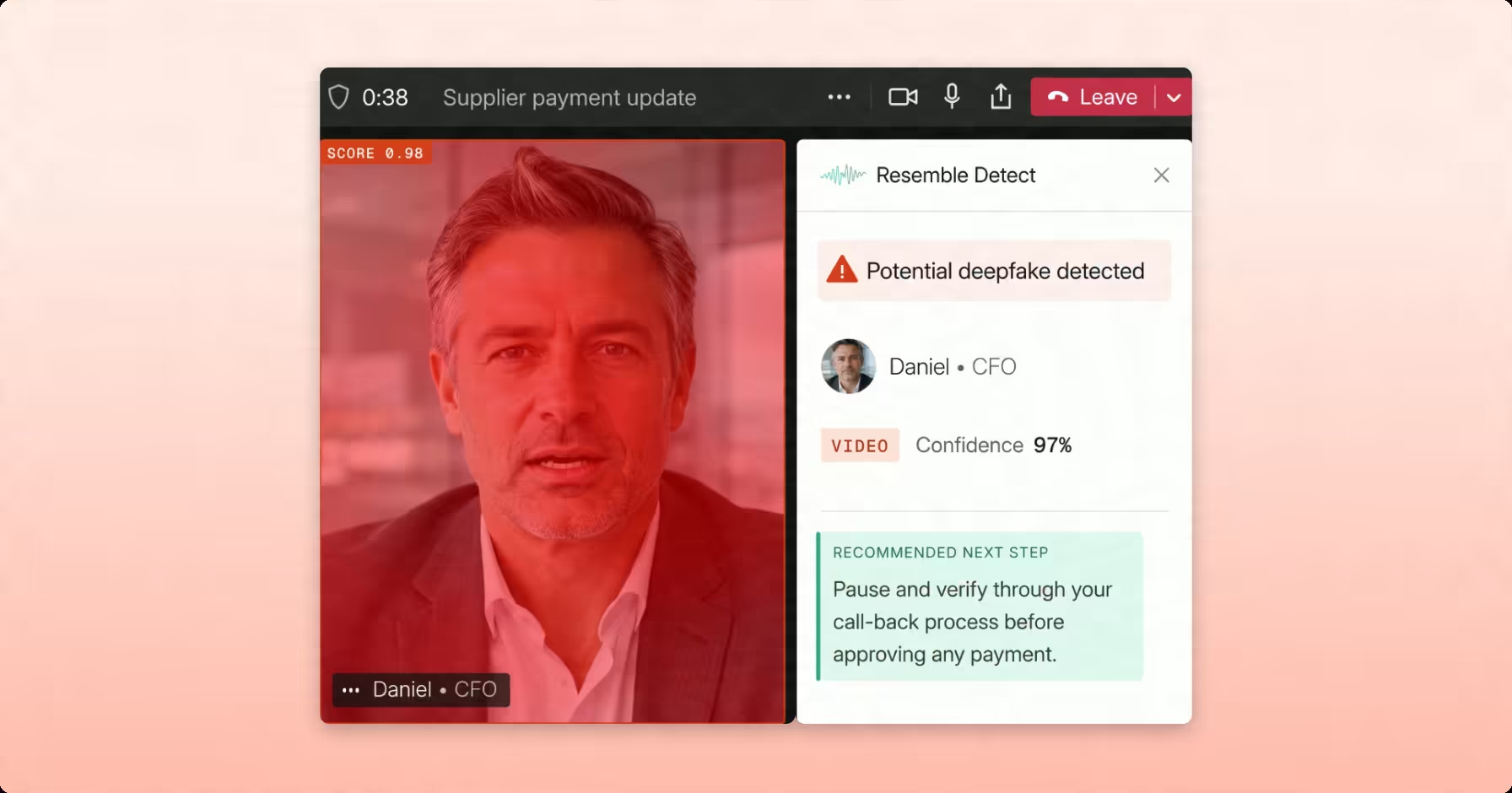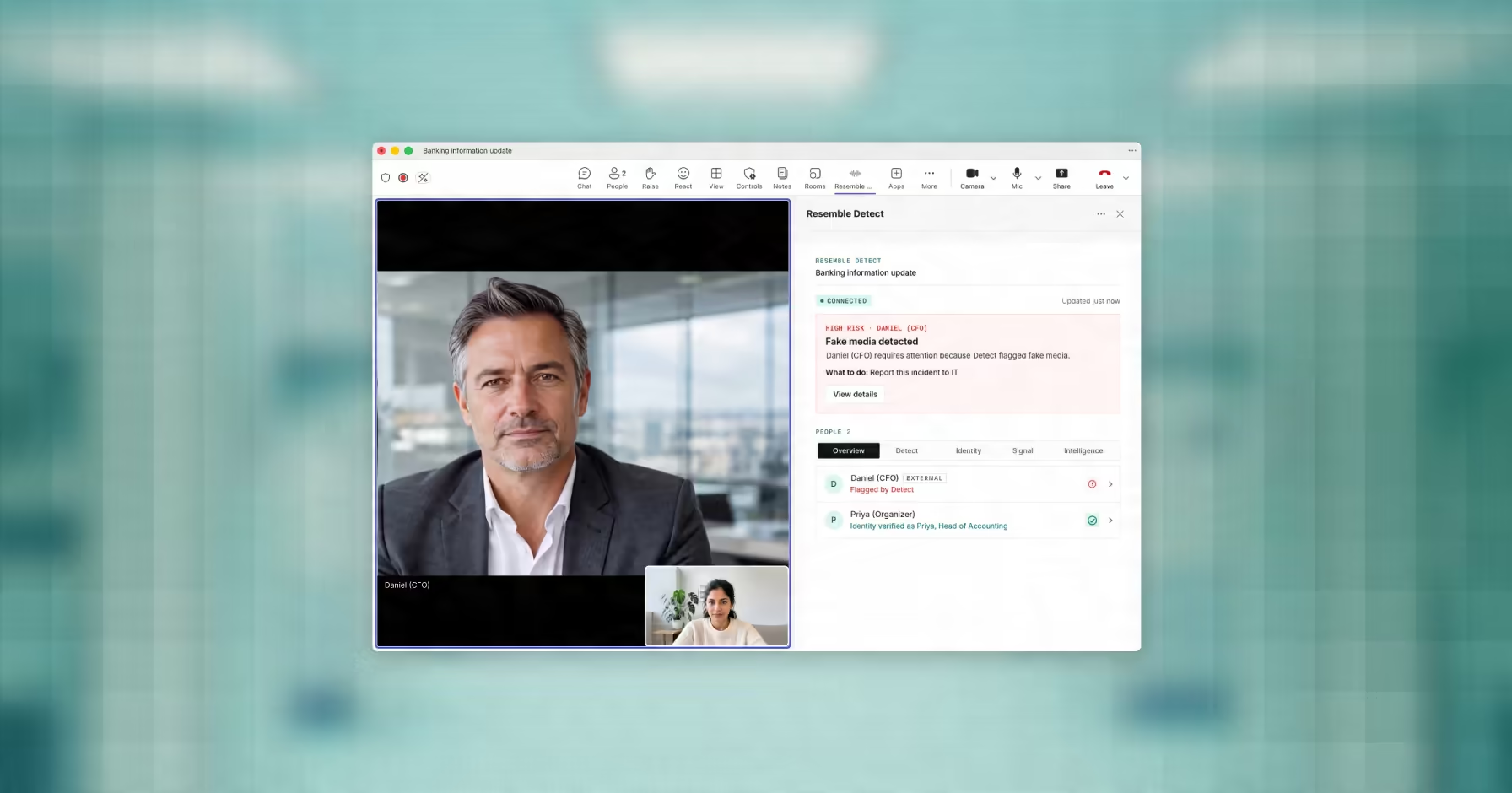

An urgent wire-transfer request arrives during a Microsoft Teams call from someone who appears and sounds like your CFO. The video and voice may be convincing enough to pass a routine glance, even if the person on screen is synthetic.
Teams calls give attackers a familiar environment in which cloned voices and face swaps can pass as ordinary participants, especially when compression, lighting changes, or audio dropouts make synthetic artifacts look like normal connection problems.
Visual anomalies can be easy to rationalize during a live call, so high-risk requests should not depend on an employee noticing a glitch before deciding whether to act.
This guide is written for IT security administrators and security operations teams evaluating how to detect deepfakes in Microsoft Teams calls and protect them from synthetic media attacks. It covers how automated detection tools work, how to harden your tenant against entry-point abuse, and what process-level controls to put in place when technology alone is not enough.
Key Takeaways
- Microsoft Teams has no native deepfake detection. IT security administrators must deploy third-party tools at the tenant level to analyze live audio and video streams.
- Three attack types target live business calls: audio-only voice clones, video puppet attacks, and hybrid attacks where only the audio stream is synthetic.
- A 2025 study found listeners identified AI-generated voices correctly only 60.8% of the time, showing why voice impersonation should not rely on human judgment alone.
- Tenant hardening through lobby controls and domain restrictions reduces the attack surface but does not replace in-call detection once a threat clears the lobby.
- Voice deepfakes are the harder Teams-specific threat because audio encoding masks the same markers that forensic tools rely on to catch cloned speech.
- Out-of-band verification through a separate authenticated channel is the final control when automated tools cannot return a confident verdict.
Why Microsoft Teams Is a High-Value Target for Deepfake Attacks
Microsoft Teams is a high-value target because it carries conversations that already come with institutional trust, including:
- Financial authorizations
- Credential approvals
- Vendor onboarding
- Executive directives
High-value approvals that once happened in person now often rely on a video tile and a familiar voice, reducing the amount of physical verification available to the employee receiving the request.
Attackers exploit that reliance on remote identity cues by trying to appear as a trusted person inside the meeting itself.
Teams is built to connect employees with vendors, partners, and clients, which means organizations must allow some degree of external access. Attackers can exploit that access by joining under fabricated identities or routing synthetic video through virtual camera inputs that Teams handles like standard camera sources.
That makes in-call verification important whenever a participant can influence payments, credentials, vendor access, or other sensitive decisions.
What You Are Up Against: Deepfake Types, Visual Tells, and Why Manual Detection Breaks Down
Before you can detect deepfakes in Microsoft Teams, you need to know what type of attack you are dealing with. Each one leaves different signals and requires a different response.
Three Attack Types Targeting Live Business Calls
Audio-only cloning: A cloned voice can be paired with a genuine, blank, or static video feed, so visual review may appear normal even though the audio is synthetic. Dedicated audio analysis is therefore important for identifying this type of impersonation.
Video puppet attacks: A fully synthetic face and voice are routed through virtual camera software. Teams reads the virtual camera as standard hardware and broadcasts it like any other webcam feed. Visual artifacts are present, but compressed streams mask many of them.
Hybrid attacks: Real video footage of the target can be paired with a synthetic audio overlay, leaving the visual feed looking normal while the manipulation remains in the audio. A detector that only inspects video can therefore miss the attack.
What To Watch For Manually
Knowing the artifacts helps, even if manual observation alone is not sufficient:
- Background blur edge bleed: Watch the boundary between the speaker’s face and the blurred background during head movement. Synthetic streams bleed pixels into the blur. Ears and earrings may disappear for a fraction of a second when the speaker turns.
- Teeth and mouth rendering: On sounds like “S” or “Z,” deepfake models render teeth as a solid white block rather than individual definitions. Tongue position is frequently static or misaligned with the phoneme being spoken.
- Audio silence between words: Listen for sudden drops into perfect silence between phrases. A real microphone usually captures some room tone, breath, or small mouth sounds even when the speaker pauses. A synthetic or heavily processed voice may sound unusually clean between words. Treat this as a review signal, not proof, because Teams compression and headset noise suppression can create similar effects.
One Teams-specific note: the platform’s video codec introduces its own compression layer on top of incoming video. This amplifies some visual artifacts, making edge bleed more visible. The significance of this for audio is covered in detail in the audio-first risk section below.
Why Manual Detection Is Not a Reliable Primary Defense
A 2025 study published in Scientific Reports found that participants correctly identified AI-generated voices only 60.8% of the time. In a separate identity-matching task, a real voice and its AI clone were judged to be the same speaker on a median 83.3% of trials.
Three reasons this matters for your Teams environment:
- Bandwidth works against you. Low-bandwidth calls drop frame rate and resolution. The same encoding that occasionally reveals artifacts also smooths over the ones that would expose an attack.
- Audio-only attacks are invisible to the eye. If the attacker uses voice cloning with a real or static video feed, there is nothing visual to catch.
- Confidence is not accuracy. Security teams that believe they can spot deepfakes manually are not more accurate. They are more likely to act on a compromised request without flagging it.
Automated tools exist because visual observation was never going to be sufficient. The next section covers how they work inside a Teams environment.
How Automated Deepfake Detection Works Inside Microsoft Teams
Detection tools built for Teams operate as passive observers in your meetings. They do not require individual users to install anything. They deploy at the tenant level, analyze audio and video streams as the call happens, and surface alerts in real time without recording or storing call content.
How the Teams-Native Integration Analyzes Calls
Resemble Detect can run inside Microsoft Teams as a pinned app for enabled users, providing live detection without adding an extra attendee to the meeting. A visible bot remains optional for organizations that prefer one.
During the meeting, Resemble analyzes live audio and video streams for signs of synthetic or manipulated media. Detection results can surface within the Teams meeting experience and through activity notifications, while administrators can define the recommended next step when a high-risk result appears.
To learn more read the announcement blog: Resemble AI Now Runs Natively in Microsoft Teams
What These Tools Actually Detect
Analysis happens across two signal types simultaneously:
- Audio signals: Spectral inconsistencies, missing paralinguistic markers such as breathing and ambient noise, and voice-clone pattern signatures that differ from live human speech.
- Video signals: Facial mesh micro-jitters, edge rendering failures, and encoding anomaly patterns inconsistent with a live camera input.
One important caveat: accuracy varies depending on call quality, encoding level, and whether the attack model was included in the tool’s training data. No tool guarantees 100% accuracy. Evaluate tools on published benchmarks, false positive rates, and latency, not vendor marketing claims.
Deploying Resemble Detect for Microsoft Teams
Deployment is controlled by IT and security administrators, who choose which users are protected and how alerts should be handled.
- Enable the Teams integration for the users or groups you want to protect
- Prioritize higher-risk groups such as finance, HR, and executive staff
- Configure the recommended next step for high-risk detections, such as pausing and verifying through a callback process
- Review live alerts, Teams activity notifications, and post-call summaries for escalation
Resemble says the Teams-native setup takes about an hour of administrator time.
If you are evaluating live meeting protection for Microsoft Teams, Resemble Detect integrates natively into Teams to analyze live audio and video and surface alerts without adding an extra attendee by default.
How to Harden Your Teams Tenant Before Deepfake Detection Starts
Tenant controls and in-call detection address different stages of the same risk. Lobby policies reduce untrusted access before the meeting starts, while detection continues evaluating participants who are already inside the call.
Lobby Controls and External Participant Policies
The majority of deepfake injection attempts rely on open meeting links or uncontrolled external access. Forcing every external participant through a lobby that requires host approval removes that entry point.
To configure this:
- Open Teams Admin Center and go to Meetings, then Meeting Policies
- Under Participants and Guests, locate Who can bypass the lobby
- Set this to Only people in my organization or People in my organization and trusted organizatio
From this point, no external participant can display video or stream audio without an internal organizer explicitly approving their entry.
For calls involving financial approvals or sensitive data, add a mandatory CAPTCHA challenge at the lobby boundary. Automated deepfake injection scripts cannot solve real-time interactive challenges. This stops the lowest-sophistication attacks before they reach the call.
Block Trial and Personal Tenant Access
Attackers use disposable Microsoft accounts or temporary trial tenants to join meetings under anonymous identities. You can close this entry point through your Entra ID settings.
- Open Microsoft Entra ID admin center and go to External Collaboration Settings
- Restrict meeting invitations to pre-verified business domains belonging to your clients, vendors, or partners
- Block connections from consumer domains such as Outlook.com, Gmail.com, and unverified cross-tenant configurations
This removes the anonymous entry points that require no technical sophistication to exploit. A sophisticated attacker using a legitimate-looking business account still passes this layer, which is why detection tooling remains a necessary second control.
The Audio-First Risk: Why Voice Deepfakes Are the Harder Threat in Teams
Visual artifacts dominate most deepfake guidance, but a Microsoft Teams call introduces an additional problem: a convincing voice clone can be paired with a legitimate or static video feed, leaving little for visual inspection to catch.
Why Teams Codec Exposes Video but Can Mask Audio Anomalies
Teams’ video encoding pipeline introduces its own compression layer on top of incoming video. This is partly why visual artifacts such as edge bleed and facial mesh failures are detectable on a call. The codec’s processing conflicts with the rendering software used to generate synthetic video, resulting in visible errors.
Teams’ audio processing prioritizes clear speech and can suppress or alter ambient noise, breathing, and other subtle acoustic cues used in forensic analysis. On degraded or low-bandwidth calls, that processing can make a cloned voice harder to assess because missing cues may resemble ordinary call quality.
What This Means for Your Detection Strategy
Visual inspection can miss vishing and hybrid attacks when the video feed is genuine or unchanged. Running audio and video analysis together gives security teams coverage across voice clones, face swaps, and cases where only one modality has been manipulated.
Verification Protocols When Technology Falls Short
Detection tools can flag many synthetic media risks, but they do not catch all of them. Poor call quality, novel attack models, and audio-only clones paired with legitimate video feeds can all make a signal harder to classify. When that happens, the last line of defense is process, not software.
These two protocols apply to every financial authorization, credential request, or sensitive directive delivered over a Teams call.
Multi-Channel Confirmation for High-Stakes Requests
Any request for a wire transfer, credential reset, or vendor payment that arrives over Teams requires confirmation through a second, independent channel before anyone acts on it.
That channel cannot be Teams chat. It cannot be email. Both run through the same session, a threat actor is already inside.
Use one of the following:
- Corporate mobile on your organization’s MDM-enrolled device list
- Encrypted enterprise messaging such as Signal for Business or an equivalent platform your security team has pre-approved
- Pre-verified direct dial to a number stored in your internal directory, not one provided during the call
Pause the transaction, step outside the session, and confirm through a channel the requester does not control. Urgent requests should still go through the same verification process before money, access, or credentials are released.
Pre-Shared Corporate Passphrases
Finance, HR, and IT teams handling sensitive authorizations should maintain rotating passphrases established entirely offline.
How this works:
- Passphrases are agreed in person or via a secure physical channel. Never set or transmitted digitally.
- Each passphrase is time-windowed, typically 72 hours, before rotating to a new one.
- At the start of any sensitive Teams call, the internal participant requests the current passphrase before any transaction is discussed.
- If the speaker cannot provide it: disconnect immediately and notify your security team.
This protocol requires no technology to implement and defeats any synthetic media attack that cannot access your offline passphrase exchange.
How Resemble AI Detects Deepfakes in Live Microsoft Teams Calls
Out-of-band confirmation and passphrases are well suited to high-risk actions such as wire transfers and credential changes, but they depend on an employee stopping the interaction and initiating a separate check. Automated detection can provide continuous coverage across a larger volume of Teams calls and surface suspicious participants while the meeting is active.
Resemble AI extends that process with continuous analysis inside the meeting environment.
Resemble Detect for Microsoft Teams: Native Live Detection
Resemble Detect can run inside Microsoft Teams as a pinned app for enabled users, analyzing live audio and video in the background without adding a visible bot to the call. Teams displays its standard recording indicator while detection is active, and organizations that prefer a visible bot can still choose that option.
IT and security admins choose who is protected and configure the recommended next step for alerts from the Resemble dashboard. Detection results can appear in the meeting flow, through Teams activity notifications, and in post-call summaries. Media from participants flagged as suspicious can be retained for review, while other participants’ media is discarded.
Detection results can be delivered through:
- In-meeting alerts and confidence signals
- Teams activity notifications
- Post-call summaries for review and escalation
Resemble AI publishes detection accuracy on Microsoft Teams at 97% based on their own benchmark testing. Accuracy varies by call quality, encoding level, and attack model. Treat published figures as a reference point, not a performance guarantee.
DETECT-World: The Model Running Underneath
Resemble Detect is powered by DETECT-World, Resemble AI’s current multimodal model for audio, image, and video. It combines detection of known generation artifacts with physical-consistency checks across lighting, motion, timing, and audio-visual synchronization, giving the model broader coverage when the source generator is unfamiliar.
For live meeting analysis, Resemble AI combines that multimodal model coverage with:
- Real-time streaming support for live detection
- Coverage: 250+ models tested
- World-model checks for unfamiliar generators
- 54 languages supported for audio detection.
Forensic Explainability for Compliance and Legal Review
A confidence score is not sufficient for incident response. Your legal team and compliance officers need documented evidence of what was flagged, why, and what the analysis shows.
Resemble Intelligence runs automatically on every flagged session and produces exportable forensic reports. Each report covers:
- Speaker profiling: language, dialect, emotion, and speaking style per participant
- Fraud classification: attack vector and confidence reasoning per flagged session
- Liveness detection: confirms whether a real person was physically present
- Audit trail: exportable for legal counsel, compliance review, and regulatory submission
Enterprise deployment options include cloud, on-premise, and air-gapped environments. GDPR and HIPAA compatibility, Active Directory integration, and SSO/SAML are supported.
Conclusion
Detecting deepfakes in Microsoft Teams calls requires a stack, not a single control. Tenant hardening closes anonymous entry points. Automated multimodal analysis helps review audio and video during the call. Out-of-band verification protects high-stakes requests when automated tools are not enough. Each layer covers what the others cannot.
For IT security administrators, SOC leads, and fraud-risk teams, the priority is not whether a call looks real. It is whether your team can verify identity before money, credentials, vendor access, or sensitive approvals are acted on.
If you’re responsible for protecting Microsoft Teams calls, use your highest-risk meetings as the evaluation point: executive approvals, finance calls, vendor access, and candidate interviews. To assess how live detection would fit your Teams environment, contact Resemble AI to review deployment options, alert workflows, and forensic reporting requirements.
Frequently Asked Questions
Can Microsoft Teams automatically detect real-time deepfakes?
Microsoft Teams has no native capability to flag synthetic audio or video during a live call. IT security administrators must integrate third-party tools through the Teams Admin Center to analyze live media streams for synthetic markers. Detection does not come out of the box.
How do attackers inject live deepfake video into a Teams meeting?
Attackers route synthetic video through virtual camera software, which Teams reads as a standard webcam input. The platform has no mechanism to distinguish between a real hardware camera and a virtual one. The manipulated feed broadcasts to all participants like any other video stream. For a deeper look at how deepfake live video calls work as an attack vector, Resemble AI’s resources cover the mechanics in detail.
Why do deepfakes look distorted against Teams background blur?
Teams background blur maps physical edge boundaries around the speaker in real time. Deepfake models continuously overlay new facial pixels on top of a base video stream. When both software layers process movement simultaneously, boundaries lag and produce pixel bleeding, flashing halos, and disappearing ear structures.
Can a CAPTCHA challenge stop a deepfake bot from entering a Teams call?
Yes, for automated injection scripts. These tools operate via programmed stream relays that cannot parse or complete interactive verification challenges. A lobby CAPTCHA stops low-sophistication, scripted attacks before they reach the call. It does not stop a human operator running a deepfake tool manually.
How does network lag hide deepfake visual flaws?
When bandwidth drops, Teams reduces stream resolution and frame rate to maintain connection stability. That encoding reduction smooths out pixelation errors, unnatural lighting mismatches, and edge-rendering failures that would otherwise be visible on a clean connection.
What is the risk of allowing trial or personal Microsoft tenants into corporate calls?
Personal and trial accounts bypass corporate credential vetting entirely. Attackers use them to construct anonymous identities in minutes and join executive or finance calls under the appearance of an external contractor or vendor. Restricting access to pre-verified business domains removes this entry point.
Do voice cloning tools replicate natural breathing sounds during a call?
Not always. Some cloned or processed voices may sound unusually clean between words, with less room tone, breath, or mouth noise than a normal microphone feed. That can be a useful signal for forensic review, but it is not reliable enough to confirm a deepfake on its own.
What mouth and tooth artifacts expose a synthetic video stream?
Deepfake models struggle with the organic physics of the inner mouth cavity during fast speech. On sibilant sounds like “S” or “Z,” synthetic streams frequently render teeth as a solid white block with no individual definition. Tongue positioning is often static or misaligned with the phoneme being spoken.
What is the difference between audio and video deepfakes in a Teams call?
Video deepfakes replace or manipulate the visual feed using face-swap or puppet models routed through virtual camera software. Audio deepfakes clone a target’s voice from publicly available recordings and synthesize speech in real time, often with a legitimate or static video feed. Hybrid attacks combine both. Each type leaves different signals, which is why single-modal tools miss a significant share of active attack types.
How accurate are AI deepfake detection tools for live calls?
Accuracy varies by tool, call quality, encoding level, and whether the specific attack model used was included in the tool’s training data. Resemble AI publishes accuracy on Microsoft Teams at 97% based on their own benchmark testing.
Can deepfake detection tools for Teams also work with Zoom and Google Meet?
Yes. Enterprise-grade tools including Resemble Meetings deploy across Microsoft Teams, Zoom, Google Meet, and Webex using the same underlying model. The same DETECT-World architecture runs across all four platforms, which matters for security teams that do not standardize on a single conferencing tool.
Where do IT security administrators configure lobby controls in Teams Admin Center?
Log in to Teams Admin Center and go to Meetings, then Meeting Policies. Under Participants and Guests, locate the lobby bypass setting and set it to only people in your organization or people in your organization and trusted organizations. This forces every external participant through a host-approval step before they can stream audio or video into the call.