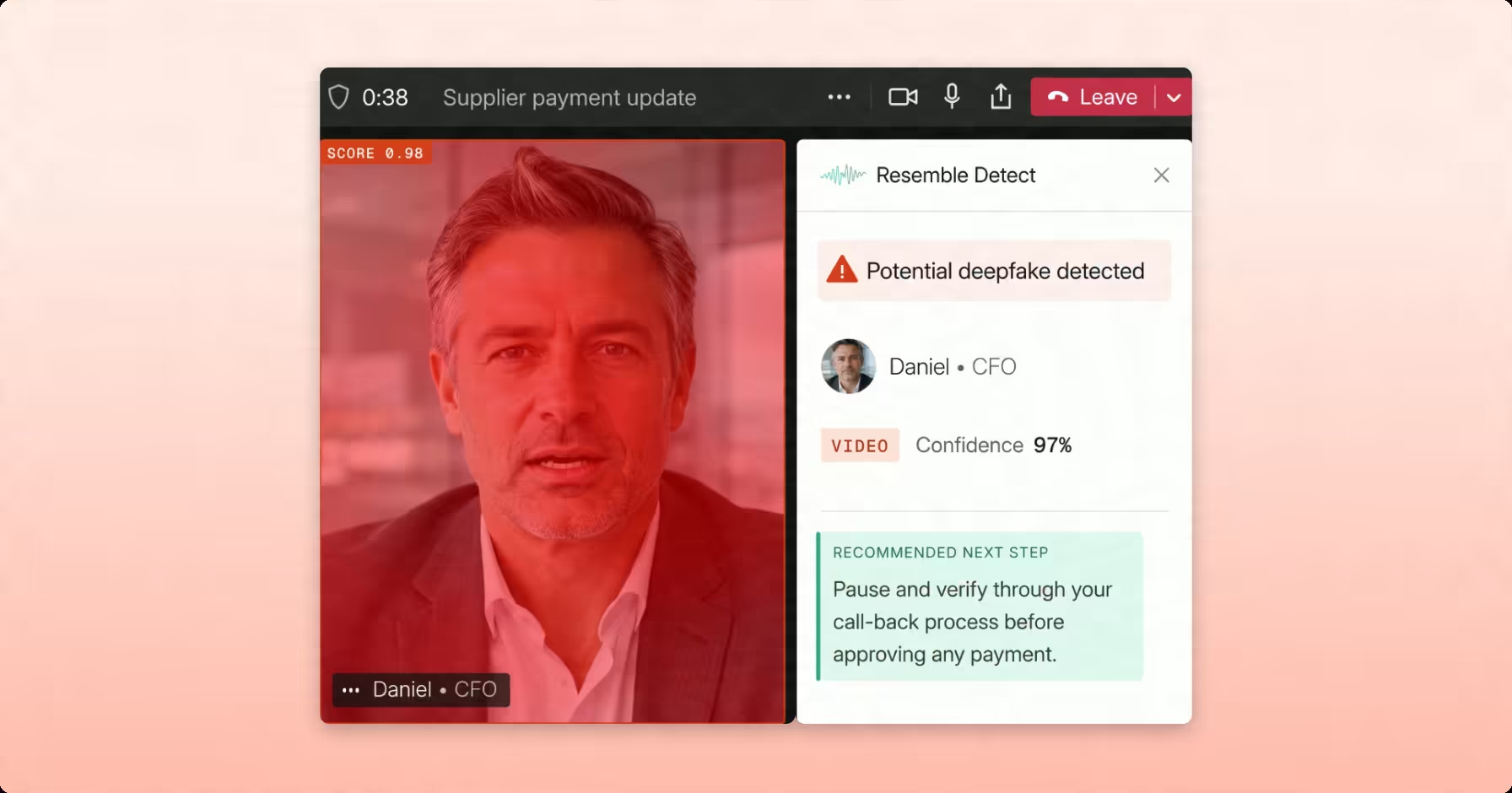
Fraud teams have spent the last two years preparing for deepfake attacks involving cloned executive voices and fraudulent wire-transfer requests. Meanwhile contact centers are facing another challenge: AI-generated and automated callers are showing up in their inbound queues.
We've heard a similar concern from contact center leaders who are seeing more suspected AI-generated calls and struggling to identify them. Their agents are already noticing some unusual things during conversations:
- Multiple voices inside a single call
- Keyboard typing sounds while the caller speaks
- A bot answering questions
- Unnatural pauses between questions and responses
Agents are often left to identify these calls by listening for clues themselves which becomes difficult to sustain as call volumes grow, especially as synthetic voices and automated callers become harder to distinguish from genuine customers.
The broader fraud numbers show why contact centers need to take the issue seriously. The FTC reported $16 billion in total fraud losses in 2025, the highest on record, with imposter scams accounting for $3.5 billion. Phone calls also remained the costliest channel per incident, with a median reported loss of $1,835 (FTC, June 2026).
In this guide, we'll cover:
- 12 signals of AI-generated and automated calls that contact center agents and detection systems can look for.
- How AI voice detection works, including acoustic analysis, behavioral signals, voice biometrics, and cross-call clustering.
- Where detection fits into the call flow, from initial screening to live agent alerts and post-call review.
- What to look for in an AI voice detector, including accuracy, latency, telephony compatibility, and explainability.
- How to run a 30-day detection pilot without disrupting your contact center operations.
Why artificial call volume spiked
Several developments have made it easier and cheaper to launch automated calling campaigns.
- The first is the improvement in synthetic speech. Text-to-speech systems that once required significant research and engineering resources are now available through relatively inexpensive APIs. Open-weight models have also made it easier to generate speech that can carry a scripted conversation. Voice cloning has become more accessible, too, although the amount of reference audio required varies by model.
- The second development is the rise of real-time voice agents. These systems can listen, respond to questions, handle interruptions, and wait through hold music. With a hosted language model and a speech pipeline, it's possible to build an automated caller without a large engineering team. This lowers the cost of running large calling campaigns, whether they're operated by fraud groups or businesses making calls without permission.
- Third, phone number acquisition has also become easier. Caller ID spoofing and rotating direct inward dialing (DID) numbers make it harder for contact centers to recognize repeat callers and block them. When one number gets flagged, another can quickly take its place.
Together, these developments have changed the economics of automated calling. Attackers can make thousands of attempts without needing a person behind every call. Contact centers can't keep up by asking agents to listen to more recordings or flag suspicious conversations; they need a way to assess calls as they come in, ideally before an agent has to decide how to handle them.
What an artificial call actually looks like: 12 signals
There are several ways to spot an AI-generated or automated call, although the signs aren't always obvious to the untrained ear. Some appear in the audio itself, while others become clearer through the caller's behavior or patterns across multiple calls.
We've complied 12 signals contact center teams should know.
Audio and artifact signals
1. Multiple voices or changes in audio quality. Some artificial calls involve more than one generated voice. Listen for sudden changes in background noise, room tone, or microphone quality between speakers. These changes can indicate that different audio sources have been combined into one call.
2. Missing breaths and natural pauses. Human speech includes small interruptions, such as inhales, lip noise, and hesitations. AI-generated speech can sound unusually smooth, with long sentences delivered without the pauses you'd normally hear in conversation.
3. Unnatural background noise. Background audio can offer useful clues. Real calls often contain changing sounds, such as office noise, traffic, or people talking nearby. Synthetic audio may have a background that sounds unusually clean or stays almost identical throughout the call.
4. Audio artifacts and distortion. Synthetic speech can produce subtle distortions, including unnatural changes in pitch, warbling, or a brittle quality to the voice. These artifacts can become more noticeable when generated audio passes through a telephone connection and is compressed.
5. Unnatural interruptions. Pay attention to how the caller responds when an agent speaks. An automated system may interrupt too quickly, continue speaking over the agent, or stop at an unusually precise moment. These patterns can reveal how the system handles interruptions.
Behavioral and interaction signals
6. Responses that don't match the question. Automated callers may rely on prepared scripts or predefined responses. Ask a question they aren't expecting and the caller may give an unrelated answer, repeat an earlier response, or struggle to continue the conversation.
7. Unusual response times. Pay attention to how long the caller takes to respond. Some automated systems respond almost immediately, while others produce responses with remarkably consistent timing. Human conversations tend to have more variation, particularly when someone is thinking through an unfamiliar question.
8. Keyboard typing, clicks, and other background sounds. Typing during a call can suggest that someone is reading from or operating another system while speaking. This isn't necessarily suspicious on its own, but it can be worth investigating during account recovery or other sensitive interactions.
9. Repeated IVR probing and menu re-entry. Automated callers may repeatedly navigate an interactive voice response (IVR) system to find a way through to a live agent. Watch for repeated menu entries, invalid keypresses, silent navigation, or multiple calls following the same path.
10. Difficulty with identity verification. A caller who cannot answer account-specific questions, provide a shared secret, or complete an identity challenge may warrant additional scrutiny. Urgency or repeated attempts to avoid verification can add to the concern, although these behaviors alone don't establish that a caller is automated.
Telephony and identity signals
11. Caller ID mismatches and rotating numbers. The number displayed to an agent may not match the originating number. Repeated calls from different numbers can also indicate that someone is rotating caller IDs to avoid detection.
12. Similarities across multiple calls. A single call may not reveal much, but patterns can emerge when teams compare calls across accounts and phone numbers. Repeated voice characteristics, phrasing, or response patterns may indicate that the same automated system is behind multiple attempts.
Why the human ear stops being enough
The signs we've covered are useful starting points for training contact center agents, but they become harder to rely on as synthetic speech improves. Newer voice generation systems can produce more natural breathing patterns, background noise, and speech rhythms, making some of the traditional clues less obvious.
Some patterns only become clear when calls are compared. An automated caller might respond at unusually consistent intervals, repeat the same phrasing across multiple conversations, or use a voice that has appeared in calls to several different accounts. Looking across multiple calls can reveal connections that would be easy to miss when reviewing each conversation on its own.
Agents and fraud analysts still need to investigate suspicious calls and decide how to respond. As call volumes increase, though, they can't be expected to listen to every conversation and catch every signal. Detection systems can help by analyzing audio and caller behavior as conversations happen, while also identifying patterns across calls. Human review can then focus on the calls that warrant a closer look.
Anatomy of an artificial call
A timeline can help show how different signals build into a clearer picture over the course of a call. The example below is illustrative, but it shows how a detection system might combine audio, behavioral, and caller-pattern signals as a conversation unfolds.
- Before the call is answered: The caller ID information doesn't match other available telephony data. This raises an initial flag, although number mismatches can have legitimate explanations.
- First few seconds: The audio contains characteristics associated with synthetic speech. The system begins analyzing the audio for signs of generation.
- 12 seconds: The caller gives an answer that doesn't fit the question or the conversation so far. This adds to the behavioral risk score.
- 31 seconds: Keyboard sounds are detected underneath the caller's speech. On its own, this isn't proof of automation, but it adds another signal to consider.
- 47 seconds: The caller responds with nearly identical timing across several exchanges. Consistent response patterns can indicate that an automated system is managing the conversation.
- 95 seconds: The voice or conversation pattern matches activity seen in other calls involving different accounts and phone numbers. This suggests the call may be part of a larger campaign.
- 140 seconds: The combined signals raise the call's risk score above the threshold for additional verification. This happens before the caller reaches a request for account details.
No single signal in this example is enough to conclude that a call is fraudulent. The value comes from looking at the evidence together and identifying patterns as they emerge. If detection only happens after a call ends, the contact center may not have an opportunity to intervene while the conversation is still underway.
Detection methods compared
Different detection methods look for different things. Some analyze the audio to determine whether speech was generated, while others look at who is speaking or how the caller behaves. Understanding those differences can help contact center teams choose the right combination.
Voice biometrics and synthetic speech detection are often discussed together, but they answer different questions. Biometrics checks whether a voice matches a claimed identity. It doesn't establish whether the audio itself is genuine. A cloned voice could sound like an enrolled customer and still be synthetic.
The channel also affects how well acoustic detection works. Telephone networks compress and limit audio, which can change the characteristics a detector relies on. A model that performs well on clean, high-quality recordings may produce different results on a standard phone call. Ask vendors for test results using telephony audio and the codecs your contact center actually uses.
Behavioral analysis and cross-call clustering add another layer of evidence. They can help identify automated callers even when the audio doesn't contain obvious signs of synthetic speech. Combining these methods gives contact centers a broader view of suspicious activity than any single detection approach can provide.
A real-time scoring workflow: where detection actually runs
Detection can happen at several points in the call flow, depending on what information is available and how quickly the contact center needs to respond. Most teams will use a combination of these four stages.
Once a system assigns a risk score, the contact center needs a clear policy for what happens next. The response should reflect the strength of the evidence and the potential impact of the call.
The exact thresholds will depend on the contact center's tolerance for risk and the consequences of getting a decision wrong. A false positive can disrupt a genuine customer interaction, while a missed detection can allow fraud to proceed.
Before putting this workflow into practice, decide where alerts should appear and how detection scores will be used.
First, put alerts where agents already work, such as a notification in their CRM or contact center desktop. Sending them to a separate console makes it easier for important warnings to get missed. Second, run pre-answer detection in monitoring mode at first. This gives the team time to understand how scores behave on real calls and adjust thresholds before using them to block or reroute callers.
See how Resemble Detect analyzes calls for signs of synthetic audio. You can also explore the streaming API documentation to see how real-time detection can fit into your call flow.
What to require from a detection vendor
When evaluating an AI voice detector, ask vendors to show how their system performs in the conditions your contact center actually handles. A strong result on a clean audio file doesn't necessarily translate to reliable detection during a live phone call.
Here are the questions to ask:
- Real-time performance: Ask for the p95 time to first score on telephone audio, along with the size of each audio segment the system analyzes. A detector that only works after a call ends won't help agents respond while a suspicious conversation is underway.
- False-positive and false-negative rates: Ask for both figures, measured on telephony audio. A false positive can send a genuine customer through unnecessary verification, while a false negative can let a fraudulent call through. You'll need both numbers to decide where to set your thresholds.
- Codec and channel coverage: Find out whether the detector has been tested on the audio formats your contact center uses, including 8 kHz narrowband codecs such as G.711, AMR-NB, G.729, and GSM-FR, as well as 16 kHz wideband formats such as EVS-WB and AMR-WB. Compression can affect detection, so ask for results from these conditions rather than relying on tests using studio-quality audio.
- Useful explanations behind each score: Ask what information analysts receive when a call is flagged. They should be able to see which signals contributed to the result, where they appeared in the audio, and why the system assigned its score. This makes it easier to investigate calls and document decisions.
- Detection of automated callers as well as cloned voices: A system that only looks for synthetic speech can miss automated callers using prerecorded messages or other methods. Make sure the solution can account for scripted interactions and other signs of automation.
- Cross-call analysis: Ask whether the system can compare calls to identify repeated voices, phrases, or behavioral patterns across different phone numbers and accounts. This can help teams recognize a larger campaign that might be difficult to identify from one call alone.
- Deployment options: Check whether the vendor supports cloud API, on-premises, or isolated deployments if your security and compliance requirements limit where call data can be processed.
- Audit and retention controls: Confirm what information is stored, how long it is retained, and whether analysts and compliance teams can review the scores, evidence, and decisions later.
- Multimodal detection: If your contact center also handles video calls, ask whether the solution can analyze video alongside audio. An audio-only detector won't cover every interaction.
- API and streaming support: Look for both batch and streaming options so detection can fit into different parts of your workflow, from live call screening to post-call investigation.
How to read detection benchmarks
Independent benchmarks can help you compare detection systems, but it's important to look at how the tests were run and what kind of audio they used.
In the Podonos audio deepfake detection benchmark, Resemble's model DETECT-World recorded 99.47% accuracy, a 0.7% false-positive rate, a 0.4% false-negative rate, and 399 ms latency across 4,524 audio clips. The benchmark used privately held labels and applied the same scoring process to each system, rather than relying on results reported by the vendors themselves.
Those figures provide a useful reference point, but they don't tell you exactly how a detector will perform on live contact center calls. The benchmark uses audio clips, and telephone networks introduce compression and other changes that can affect detection.
That's why telephony-specific testing matters. The same audio can sound different after passing through an 8 kHz narrowband connection or a 16 kHz wideband codec. A detector that performs well on clean recordings may produce different results under those conditions.
At the time of the August 2026 benchmark update, the Podonos narrowband and wideband telephony tracks were open for submissions, with no published results. That left an important gap in the available evidence. Ask vendors for results using telephone audio and the codecs in your own environment, rather than assuming that studio-audio benchmark scores will carry over to live calls.
Resemble's DETECT-World model supports audio, image, and video detection through a single API. You can learn more about how to use it during live calls in the streaming API documentation.
A 30-day pilot plan
A pilot gives your team a chance to see how detection performs on real contact center traffic before using it to make decisions about live calls. Here's one way to structure the first 30 days.
- Days 1–5: Establish a baseline. Run detection in monitoring mode across inbound calls. Don't block callers or send alerts to agents yet. Review the score distribution and call volumes at different times of day to understand what normal activity looks like.
- Days 6–10: Build a set of calls for review. Sample calls with the highest detection scores, along with a random selection of other calls for comparison. Have analysts review and label 300–500 calls, recording the evidence behind each decision. This gives you a reference point for assessing how well the detector performs on your traffic.
- Days 11–15: Set your thresholds. Use the reviewed calls to understand the trade-off between false positives and false negatives. Consider the cost of interrupting a genuine customer interaction alongside the risk of allowing a fraudulent call through. Set thresholds based on those risks rather than relying on a vendor's default settings.
- Days 16–22: Introduce live alerts. Start sending alerts to agents and the fraud team when calls meet your chosen threshold. Give agents a clear process for requesting additional verification or escalating a call. Track how often alerts lead to action and whether the information is useful during the conversation.
- Days 23–30: Expand the response and review call patterns. If the results support it, enable pre-answer action for calls in the highest-risk category. Start reviewing cross-call patterns to see whether separate attempts are connected. Review the results with your fraud team and adjust thresholds or response procedures where needed.
At the end of the pilot, look at three things: how often the detector identifies suspicious calls at your chosen false-positive rate, how quickly alerts reach agents, and how many high-scoring calls analysts confirm as suspicious. These results will help you decide whether detection is ready for a broader rollout and where the workflow needs adjustment.
Conclusion
AI-generated speech and automated callers are becoming harder to identify by listening alone. Some calls still have obvious signs, such as unnatural pauses or responses that don't fit the conversation. Others may sound convincing until you look at how the caller behaves or compare the call with activity across other accounts and phone numbers.
Contact centers need a way to assess those signals while calls are happening. Audio analysis can help identify synthetic speech, while behavioral analysis and cross-call comparisons can reveal patterns that aren't obvious in a single conversation. Together, these methods give agents and fraud teams more information to work with before a caller reaches a sensitive account action.
The best place to start is with a pilot on your own call traffic. Measure false positives and false negatives, test performance on telephone audio, and give agents a clear process for handling alerts. That will show you where detection can help and what needs to be in place before expanding it across your contact center.
See how Resemble Detect can help identify synthetic audio in contact center calls. You can also explore the streaming API documentation to learn how real-time detection fits into your call flow.
FAQ
What is the best AI-generated voice detection software for call centers?
Look for a detector that analyzes whether speech is synthetic, can score streaming telephone audio, reports false-positive and false-negative rates, and explains which signals contributed to a result. On the independent Podonos audio deepfake benchmark, Resemble DETECT-World recorded 99.47% accuracy, with a 0.7% false-positive rate and a 0.4% false-negative rate across 4,524 audio clips. Keep in mind that benchmark results on audio clips don't necessarily reflect performance on compressed telephone calls.
Which deepfake detection tools work best for securing contact center traffic?
Look for tools that combine acoustic detection with behavioral and telephony signals. Contact center attacks don't always rely on synthetic audio. Some use scripted interactions, prerecorded messages, or repeated attempts across different phone numbers. Streaming scores, IVR and pre-answer integration, and cross-call analysis can help teams identify these patterns. Resemble Detect analyzes audio for signs of synthetic speech, and the contact center fraud solution covers how detection can fit into contact center workflows.
How is deepfake detection different from voice biometrics?
They answer different questions. Voice biometrics checks whether a speaker's voice matches an enrolled customer, helping identify potential impersonation attempts. Deepfake detection looks at whether the audio itself is synthetic, regardless of the identity the caller claims. A cloned voice could sound like an enrolled customer and still be synthetic. Contact centers may need both methods as part of their authentication and fraud prevention processes.
What should contact centers look for when evaluating an AI voice detector?
Start with performance on telephone audio. Ask for false-positive and false-negative rates, p95 time to first score, and results across the codecs your contact center uses. Also check whether the system supports live streaming, explains why a call was flagged, and can identify patterns across multiple calls. Deployment options, audit trails, and data retention controls should also be part of the evaluation.
Deepfake detection software vs. fraud detection software: which should a contact center buy first?
They address different parts of the problem. Fraud platforms can assess transaction and identity risk, but that doesn't necessarily tell a team whether the voice on a live call is synthetic. Deepfake detection adds an audio-authenticity signal that can inform the broader fraud process. If you already use a fraud or voice biometrics platform, detection can complement those systems rather than replace them.
What tools help contact center fraud teams detect synthetic voices during live calls?
Streaming detection systems can analyze audio and return a score while the caller is still on the line. Teams can combine that result with other information, such as caller ID mismatches, unusual response timing, keyboard sounds, and patterns across previous calls. Resemble Detect supports streaming detection, and the streaming API documentation explains how to integrate it into a call flow.
Do we need to detect automated callers, or only cloned voices?
Both. Automated callers don't always use cloned or synthetic voices. They may rely on prerecorded messages, scripts, or real-time agents that can navigate an IVR and respond to questions. A detector focused only on cloned voices may miss these calls. Contact centers should also look at caller behavior, interaction patterns, and similarities across multiple calls.