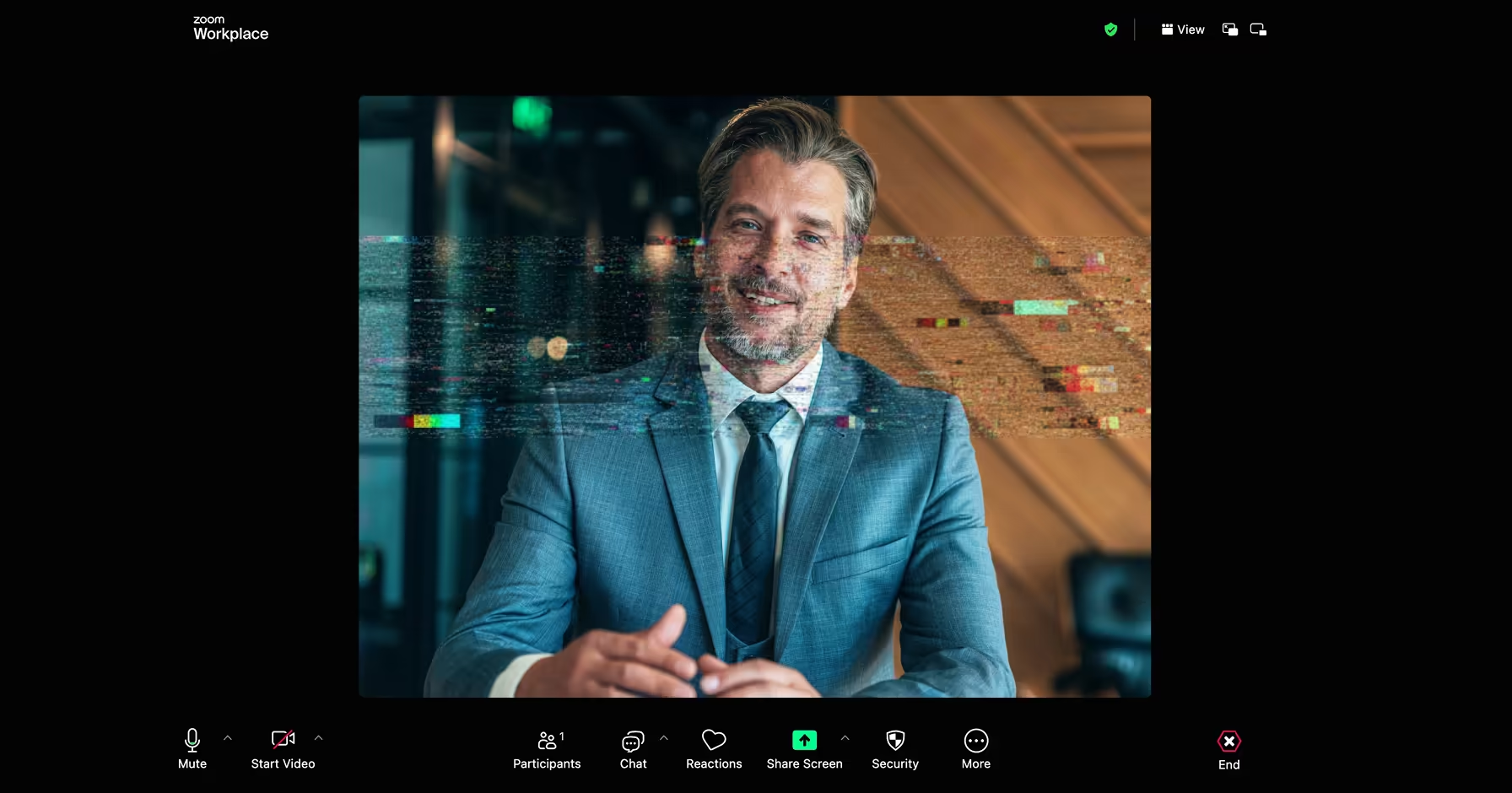

Video meetings have become part of everyday operations across customer support, executive communications, remote hiring, financial approvals, healthcare consultations, and media production. At the same time, AI-generated audio and video have become realistic enough that organizations can no longer assume every participant on a call is who they claim to be.
Deepfake detection for Zoom platforms is designed to help organizations identify signs of synthetic audio, manipulated video, or identity impersonation during live meetings. This guide explains how these platforms work, why they matter in 2026, what features to evaluate, and what organizations should verify before deploying them.
According to a 2025 Gartner survey reported by The Register, 36% of organizations that experienced deepfake attacks reported video-based deepfakes as part of those incidents. As a result, many organizations are increasing investments in meeting authentication, identity verification, and deepfake detection capabilities.
Organizations are increasingly relying on dedicated meeting-security platforms such as Resemble Meetings to analyze live conversations for deepfake audio, manipulated video, liveness signals, and identity impersonation while generating explainable forensic reports for security teams.
TL;DR
- Deepfake detection for Zoom refers to tools that analyze live audio and video feeds during meetings to identify signs of AI-generated or synthetic manipulation.
- Enterprise security operations, financial services, contact centers, HR and recruitment, and high-value executive communications
- Voice cloning, face-swapping, and synthetic persona attacks during live calls can bypass standard identity verification methods.
- Detection accuracy can vary depending on audio compression, video quality, and the sophistication of the generative model used in the attack.
- Real-time analysis latency, multi-modal coverage (audio + video), integration with your existing meeting platform, audit trail support, and false positive rates.
Why Deepfakes Are a Growing Threat in Video Meetings
The risk posed by deepfakes in video meetings has grown significantly as generative AI tools have become faster, cheaper, and more accessible. What once required hours of training data and specialized expertise can now be achieved with a short audio sample and widely available software. According to the World Economic Forum's Global Cybersecurity Outlook 2026, 73% of respondents were directly affected by cyber-enabled fraud in 2025, making it the top cyber concern among CEOs.
The specific challenge with deepfake detection for Zoom and similar platforms is that attacks happen in real time. There is no file to upload and analyze afterward. Fraudulent audio and video must be identified within seconds of a meeting starting, before decisions are made, credentials are shared, or funds are authorized.
Why Deepfake Detection Matters for Zoom and Video Meetings
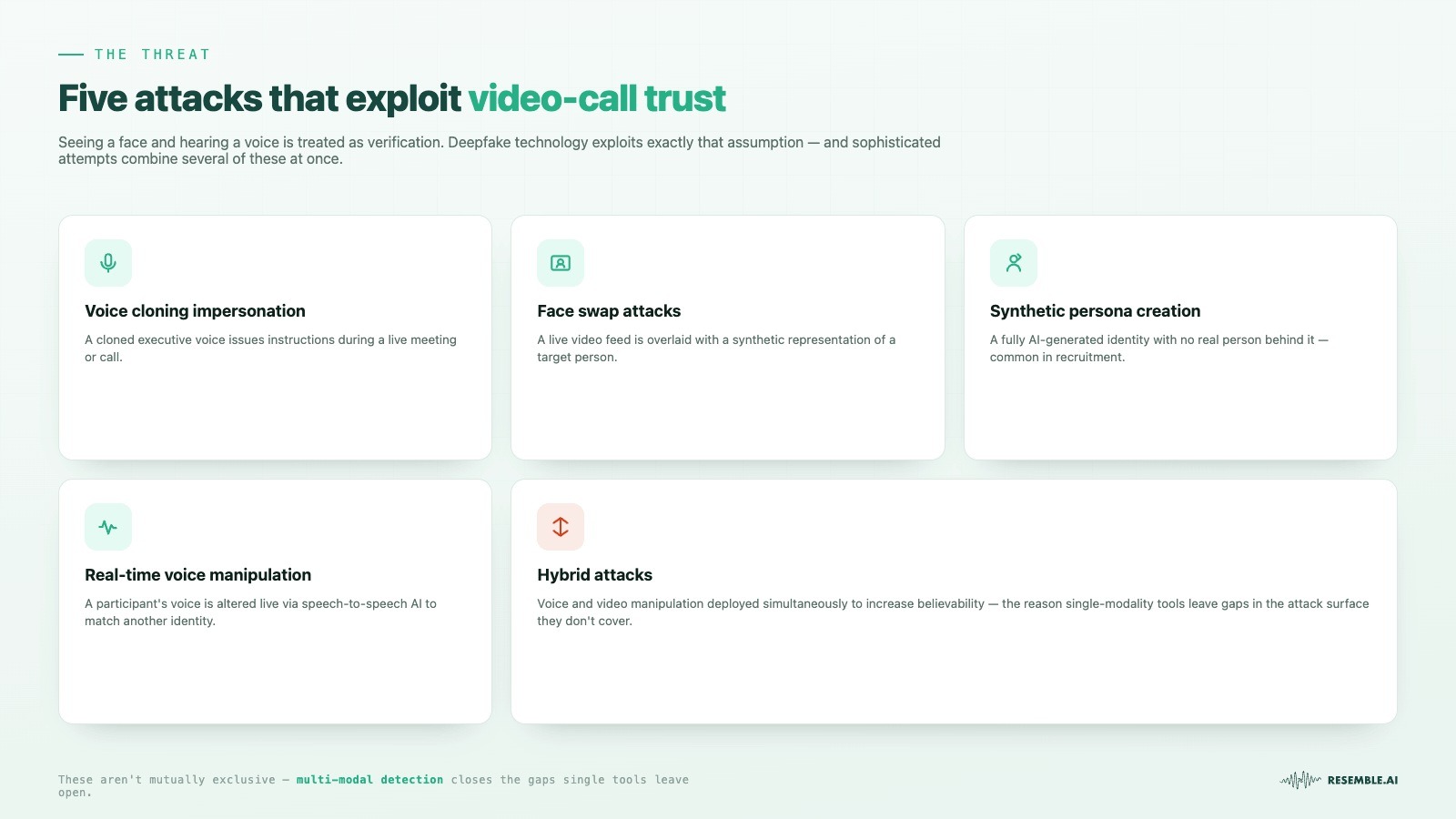
Live video meetings carry a level of implicit trust that other communication channels do not. Seeing someone's face and hearing their voice is typically treated as verification that the person is who they claim to be. Deepfake technology exploits that assumption.
The types of attacks organizations encounter in video meeting environments include:
- Voice cloning impersonation: A cloned version of an executive's voice is used to issue instructions during a meeting or call.
- Face swap attacks: A live video feed is replaced or overlaid with a synthetic representation of a target individual.
- Synthetic persona creation: A fully AI-generated identity with no real person behind it is used to infiltrate meetings, particularly in recruitment contexts.
- Real-time voice manipulation: A participant's voice is altered in real time using speech-to-speech AI to match a different identity.
- Hybrid attacks: A combination of voice and video manipulation is deployed simultaneously to increase believability.
These attack types are not mutually exclusive. More sophisticated attempts often combine audio and visual manipulation, which is why single-modality detection tools, covering only voice or only video, can leave organizations exposed to attack vectors they do not cover.
Also Read: How to Detect Deepfake Interviews in Remote Hiring (2026)
Why Organizations Need Deepfake Detection For Zoom Solutions
Most standard video conferencing platforms do not include built-in, enterprise-grade deepfake detection by default. Native features from platforms like Zoom, including recent additions, represent a starting point, but organizations in regulated industries or high-risk environments typically require more precise control, audit trail documentation, and integration with existing security workflows.
The operational reasons for dedicated deepfake detection for Zoom include:
- Fraud prevention in financial services: Authorization workflows conducted via video calls pose a genuine fraud risk when participant identities cannot be verified.
- Recruitment security: Deepfake candidates using face swaps or synthetic audio to pass remote screening interviews represent a documented and growing problem.
- Executive impersonation detection: CFO and CEO voice cloning during scheduled meetings is one of the most common and costly attack vectors currently in use.
- Contact center integrity: Voice-based customer verification systems are actively targeted by cloned voices attempting to bypass authentication.
- Compliance and legal accountability: When a deepfake incident is reported after a call, organizations need documented evidence of the meeting's composition, something most platforms do not generate automatically.
- Regulated industry requirements: Government, defense, healthcare, and financial institutions often require detection infrastructure that meets data residency, audit, and security certification standards.
The requirement is not just detection. It is detection that produces usable, exportable forensic records and integrates into the workflows organizations already run.
How Deepfake Detection Technology Works for Zoom and Video Meetings
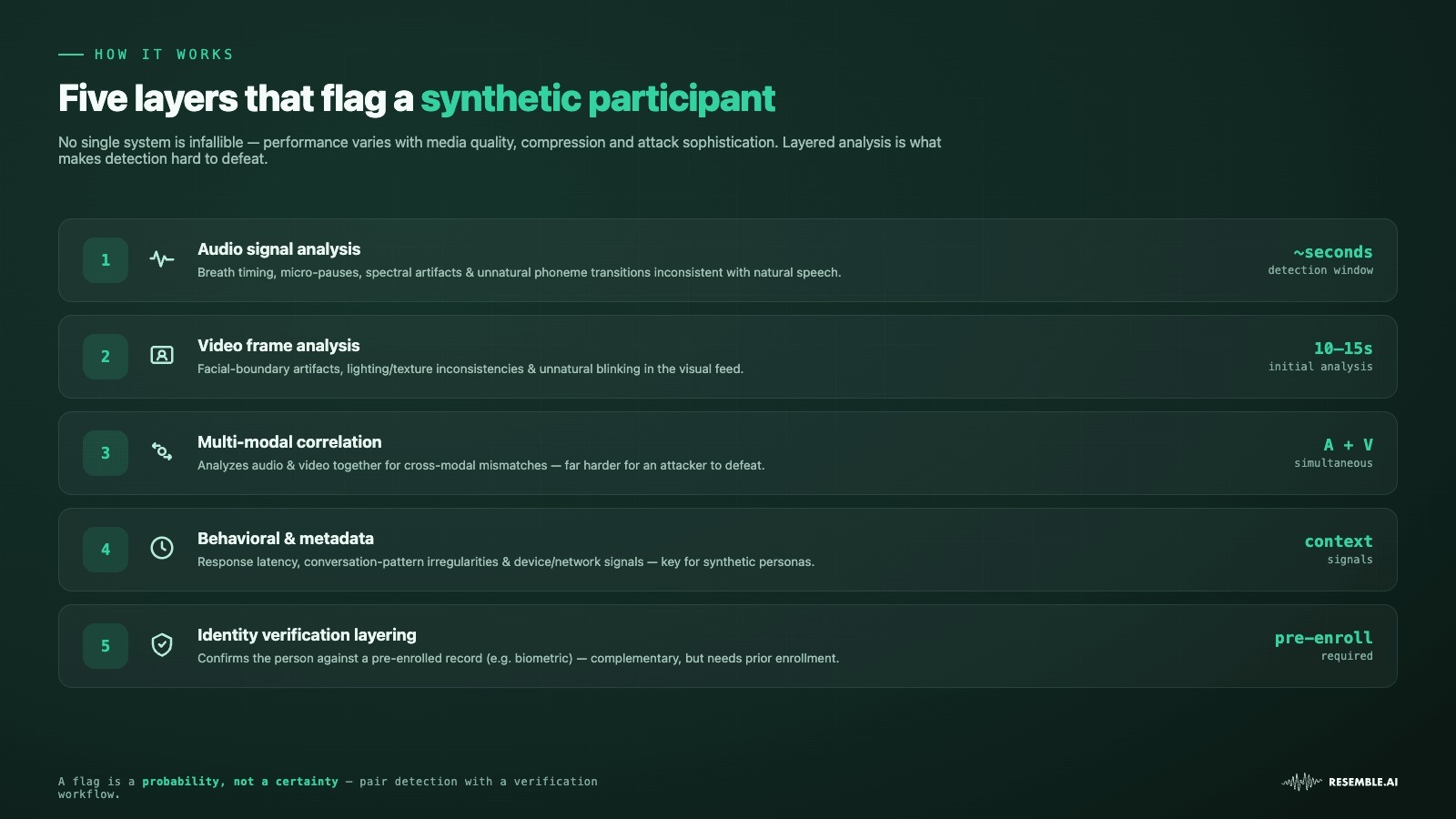
Understanding how detection systems function helps organizations set realistic expectations and evaluate platforms with more precision. No detection system is infallible. Performance can vary depending on the quality of the synthetic media used in the attack, the compression applied by the conferencing platform, and the detector's model architecture.
1. Audio Signal Analysis
Audio detection systems analyze voice feeds for patterns that are statistically inconsistent with natural human speech. These may include irregularities in breath timing, micro-pauses, spectral artifacts introduced by synthesis models, or unnatural consistency in phoneme transitions. Detection windows are typically short, with many systems analyzing only a few seconds of audio before generating a confidence score.
2. Video Frame Analysis
Video deepfake detection focuses on identifying signs of synthetic manipulation in the visual feed. This includes analyzing facial boundary artifacts, inconsistencies in lighting and texture, unnatural blinking or eye movement patterns, and compression artifacts introduced by face-swap or face-reenactment models. Systems typically require ten to fifteen seconds of video feed to complete an initial analysis. Performance can degrade when video resolution is low or when the meeting platform applies heavy compression.
3. Multi-Modal Correlation
More advanced detection systems analyze audio and video simultaneously and look for cross-modal inconsistencies, situations where the visual and audio signals do not align in ways consistent with natural human communication.
This approach is harder to defeat because an attacker would need to make both the audio and video streams pass detection independently while also maintaining coherence between them.
4. Behavioral and Metadata Analysis
Some detection platforms supplement audio-visual analysis with behavioral signals, including response latency, conversation pattern irregularities, and device or network metadata, to flag anomalies that may indicate a synthetic participant. This is particularly relevant to synthetic persona attacks, in which a fully generated identity is used rather than a clone of a real person.
5. Identity Verification Layering
A separate but complementary approach to detection is biometric identity verification, confirming that the person on the call is who they claim to be against a pre-established identity record, rather than trying to determine whether the media feed itself is synthetic. Zoom's beta integration with World ID via Tools for Humanity takes this approach, using iris-based verification to confirm human presence. This method sidesteps some detection limitations but requires participants to have pre-enrolled their identities, which limits practical deployment in many meeting contexts.
Key Features to Look for in a Deepfake Detection for the Zoom Platform
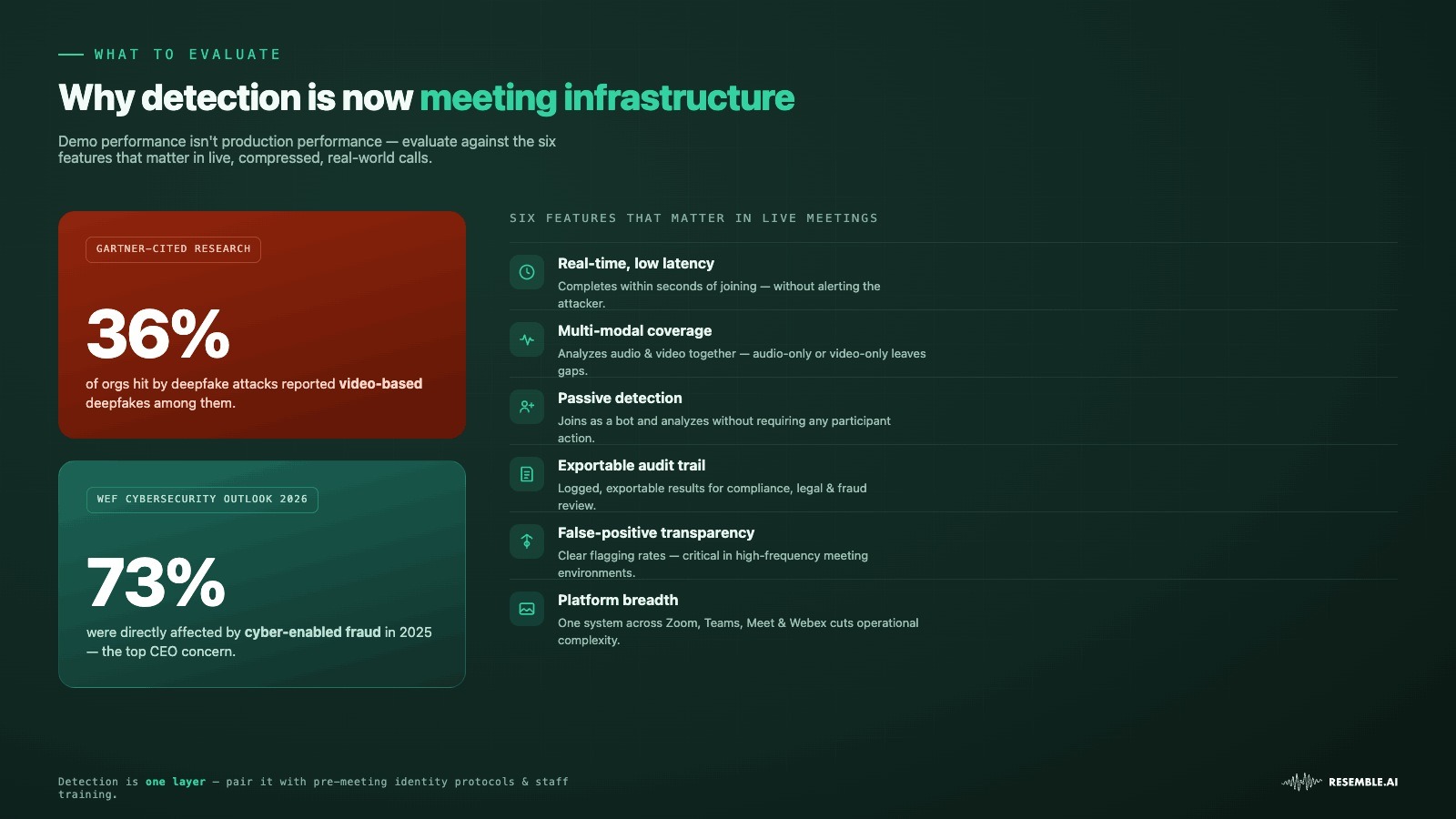
When evaluating deepfake detection platforms for video meetings, demo performance is not a reliable proxy for production performance. Compression, network conditions, and attack sophistication in real environments differ significantly from controlled test conditions.
Features that matter most in a live-meeting detection context include:
- Real-time multimodal analysis: The platform should analyze audio and video together rather than relying on a single modality. Cross-modal correlation helps identify attacks where synthetic voices and manipulated video are used simultaneously.
- Explainable forensic reports: Detection systems should provide evidence behind every alert—not just a confidence score. Reports that include liveness analysis, digital alteration indicators, fraud classification, and reasoning help security teams investigate incidents and support compliance workflows.
- Passive meeting monitoring: Detection should operate in the background without interrupting participants or requiring additional verification steps during routine meetings.
- Cross-platform compatibility: Organizations rarely rely on a single conferencing platform. Support for Zoom, Microsoft Teams, Google Meet, and Webex simplifies deployment and ensures consistent protection across collaboration environments.
- Liveness detection and identity verification: Platforms should distinguish between real participants and synthetic or replayed media while supporting identity verification workflows for high-risk meetings.
- Multilingual detection performance: Enterprise meetings happen across multiple languages. Detection systems should maintain strong performance across diverse accents and languages rather than being optimized primarily for English-language content.
- Exportable audit trails: Detection results should generate structured forensic reports that security, compliance, and legal teams can review after an incident.
- Operational transparency: Vendors should clearly communicate detection performance, benchmark results, and known limitations rather than relying only on marketing claims.
- Flexible deployment: Support for cloud, on-premises, and air-gapped environments is important for organizations operating under strict security or regulatory requirements.
A useful evaluation approach is to test platforms using realistic meeting conditions rather than controlled demonstrations. Detection performance can vary when bandwidth fluctuates, cameras are of low quality, or background noise affects audio streams.
Top 5 Deepfake Detection Platforms for Zoom and Video Meetings
Organizations evaluating deepfake detection for video conferencing should look beyond simple claims of detection. The most useful platforms combine real-time analysis, workflow integration, explainability, and coverage across audio and video signals. The right choice depends on whether your priority is fraud prevention, meeting security, identity verification, or synthetic media governance.
1. Resemble AI: Real-Time Deepfake Detection
Resemble AI offers a comprehensive solution for detecting deepfakes in live video meetings. Its AI-driven system monitors audio, video, and contextual signals in real time to identify synthetic content with high accuracy.
The platform also provides provenance verification through watermarking and integrates seamlessly with major conferencing tools such as Zoom, Teams, Meet, and Webex. With open-source components for experimentation and customization, Resemble AI is designed to help organizations maintain security, authenticity, and trust in virtual interactions.
Best For: Organizations that need enterprise-grade meeting security with multimodal deepfake detection, explainable forensic analysis, and support across Zoom, Microsoft Teams, Google Meet, and Webex.
Key Features to Detect Deepfakes in Live Meetings:
- Resemble Meetings: Joins scheduled meetings across Zoom, Microsoft Teams, Google Meet, and Webex as a passive participant to analyze live audio and video for signs of synthetic media. The platform performs real-time multimodal detection and generates explainable forensic reports that help security teams understand why content was flagged, rather than returning only a binary result.
- Resemble Intelligence: Provides explainable forensic analysis for every detection by combining liveness detection, digital alteration analysis, fraud classification, misinformation assessment, anti-cheating detection, and structured audit reports. These explanations help security and compliance teams investigate incidents and document evidence.
- Multimodal Watermarking: Supports machine-readable provenance through multimodal watermarking, helping organizations verify the authenticity of AI-generated content alongside live deepfake detection workflows.
- Independently Benchmarked Detection: Resemble AI's detection models achieved the highest overall performance in an independent 2026 benchmark comparing eight commercial audio deepfake detection systems, outperforming several established vendors across both known and previously unseen attack models.
Practical Use: Security, HR, and fraud teams can continuously monitor executive meetings, remote hiring interviews, financial approval sessions, and customer verification calls while receiving explainable alerts that support rapid investigation and response.
Also read: Detect Candidate Fraud in Remote Hiring
2. Reality Defender
Reality Defender focuses on real-time deepfake detection. The platform analyzes audio and video streams to identify AI-generated impersonations and manipulated media.
Best For: Organizations seeking broad multi-modal deepfake detection coverage.
Key Features
- Real-time meeting monitoring
- Audio and video analysis
- Zoom and Teams integration support
- API-based deployment options
- Enterprise-scale detection workflows
Limitations: Independent benchmark testing published in 2026 showed lower detection accuracy (71.3%) than Resemble AI (98.1%) and other providers across several audio deepfake datasets, highlighting the importance of evaluating platforms using third-party testing rather than vendor claims.
3. Pindrop Pulse for Meetings
Pindrop Pulse for Meetings is designed specifically for real-time video call security. It combines voice, video, and location intelligence to identify potential impersonation attempts during live interactions.
Best For: Fraud prevention teams and organizations handling high-value transactions or executive communications.
Key Features
- Real-time voice and video analysis
- Location intelligence capabilities
- Meeting platform integrations
- Risk scoring during active sessions
- Identity verification support
Limitations: Strong emphasis on fraud prevention use cases rather than broader synthetic media workflows and again lower audio detection accuracy then Resemble AI after an independent 2025 benchmark.
4. Zoom
Zoom has introduced identity verification capabilities through its partnership with Tools for Humanity. The system focuses on verifying whether meeting participants are genuine humans rather than on analyzing all media for manipulation.
Best For: Organizations seeking participant verification for sensitive meetings.
Key Features
- Real-time participant verification
- Verified Human badges
- Deep Face authentication workflows
- Privacy-focused verification process
- Zoom-native integration
Limitations: Zoom's native capabilities focus primarily on participant identity verification rather than continuous multimodal deepfake detection. Organizations requiring forensic analysis, explainability, fraud classification, or audit-ready reporting typically supplement Zoom with dedicated meeting-security platforms.
5. OmniSpeech
OmniSpeech focuses on detecting synthetic speech and voice manipulation across enterprise communication channels. The platform is designed to help organizations evaluate audio authenticity in environments where voice trust matters.
Best For: This solution is well-suited for voice authentication systems, call centers, and enterprise communication environments.
Key Features
- Audio authenticity analysis
- Synthetic speech detection
- Enterprise deployment options
- Voice risk assessment workflows
Limitations: Organizations evaluating video deepfakes may require additional visual detection capabilities.
Also Read: Audio Deepfake Detection Benchmark Results: How 8 Systems Performed in 2026
Best Practices for Preventing Deepfake Attacks During Video Meetings
Detection technology is one layer of a defensive strategy, not the entire strategy. Organizations that rely exclusively on automated detection are accepting the residual risk that a sufficiently sophisticated attack will not be flagged.
Practical steps organizations can take include:
- Establish pre-meeting identity protocols for high-value calls: For meetings involving financial authorization, executive decision-making, or sensitive data sharing, require identity confirmation through a separate channel before the meeting starts.
- Train staff to recognize behavioral indicators: Deepfake attacks often produce subtle anomalies in speech timing, response coherence, or visual behavior that attentive participants can identify even without automated tools.
- Apply detection to scheduled, high-risk meetings by default: Not every meeting requires active deepfake scanning. Define which meeting types, executive calls, financial reviews, and vendor onboarding should have detection enabled by policy.
- Do not treat detection alerts as definitive: A flag from a detection system indicates a probability, not a certainty. Establish a verification workflow, such as a callback to a known number, for participants flagged as potentially synthetic.
- Maintain and review audit logs: Post-incident review of detection logs helps identify attack patterns, refine detection policies, and provide documentation for legal or regulatory purposes.
Also Read: Real-Time Liveness Detection Solutions for Deepfake Fraud
Final Thoughts
Deepfake detection on Zoom platforms is becoming an important part of meeting security strategies as organizations increasingly rely on virtual communication. Voice cloning, face swaps, and synthetic personas introduce new verification challenges that traditional meeting controls were not designed to address.
Resemble AI approaches meeting security through a multimodal verification platform that combines real-time deepfake detection, explainable forensic analysis, watermarking, liveness detection, and fraud intelligence. Rather than simply flagging suspicious media, the platform helps organizations understand why content was identified as risky and provides evidence that supports security investigations, compliance, and operational decision-making.
Ready to secure your Zoom and Video meetings with real-time deepfake detection? Book a demo to get started today!
FAQs
- What is a deepfake detection for the Zoom platform? A deepfake detection for the Zoom platform analyzes meeting audio and video for synthetic media indicators. It helps organizations identify potential impersonation attempts during live virtual interactions.
- Can deepfake detection tools identify voice cloning attacks? Many platforms analyze audio characteristics associated with synthetic speech generation. Detection effectiveness may vary depending on audio quality and attack sophistication.
- Do Zoom meetings currently support deepfake detection capabilities? Zoom has announced initiatives involving deepfake risk detection and participant verification features. Organizations should evaluate available integrations and deployment options carefully.
- Are deepfake detection systems always accurate? No detection system guarantees perfect results under every condition. Performance often depends on meeting quality, media type, and attack techniques.
- Why are video meetings becoming targets for deepfake attacks? Video meetings combine identity, trust, urgency, and decision-making into one environment. These characteristics can make impersonation attempts more impactful.
- What industries benefit most from deepfake detection platforms? Financial services, healthcare, government, customer support, and enterprise security teams often evaluate these solutions. High-trust communications typically create stronger requirements for verification.
- Can deepfake detection work during live meetings? Some platforms are designed for real-time analysis of ongoing sessions. They may generate alerts when suspicious patterns appear.
- What should organizations test before deployment? Organizations should test audio-quality handling, video-analysis performance, integration workflows, scalability, and alert accuracy under realistic conditions.
- Is identity verification different from deepfake detection? Yes. Identity verification confirms participant authenticity, while deepfake detection analyzes media for indicators of manipulation. Many organizations combine both approaches.
- How do fraud teams use deepfake detection solutions? Fraud teams often use detection tools as additional risk signals. These systems can support broader verification and investigation processes.
- Can customer support teams benefit from meeting verification tools? Customer-facing teams may use verification controls to support trust during sensitive interactions. This can be valuable when identity confirmation is important.
- What is the biggest mistake when evaluating deepfake detection platforms? Many teams focus only on vendor accuracy claims. Operational testing often provides more useful insights than benchmark numbers alone.