
It has been said repeatedly in the previous blogs that AI has been a game changer for individuals everywhere. But today, we’re going to tackle an avenue that has been widely used by companies—ads—and how you can use AI voices for your ads. Yes, you can use them in your marketing efforts, too.
/divi:paragraph divi:paragraphVoices play a crucial role in capturing attention and conveying messages effectively. This makes it the perfect tool to communicate your messages to your target audience.
/divi:paragraph divi:paragraphWith advancements in AI, creating professional voiceovers has become easier and more accessible. Resemble.ai offers a robust platform for generating AI voices tailored for advertisements. This blog will guide you through using AI voices for ads and utilizing Resemble.ai‘s marketplace to find the perfect voice for your brand.
/divi:paragraph divi:image {"id":20204758,"sizeSlug":"large","linkDestination":"none"}
Why Use AI Voices for Ads?
/divi:heading divi:paragraphAI voices offer several advantages for advertisements:
/divi:paragraph divi:list {"ordered":true}- divi:list-item
- Cost-Effective: AI voices eliminate the need to hire voice actors, reducing costs significantly. divi:list-item
- Consistency: AI voices provide consistent quality and tone across multiple ads. divi:list-item
- Flexibility: You can generate multiple variations of the same script quickly, allowing for A/B testing and optimization. divi:list-item
- Speed: AI voices can be produced almost instantly, speeding up the production process.
Using AI Voices for Ads
/divi:heading divi:heading {"level":3}Sign Up and Log In
/divi:heading divi:list {"ordered":true}- divi:list-item
- Go to Resemble.ai and sign up for an account. If you already have an account, log in. divi:list-item
- Choose a Plan: Select a subscription plan that suits your needs. The basic plan is suitable for beginners.
Create a New Project
/divi:heading divi:list {"ordered":true}- divi:list-item
- Navigate to the Dashboard: After logging in, go to the dashboard and click on “Create New Project.” divi:list-item
- Name Your Project: Give your project a name, such as “Ad Voiceovers.”
Utilize the Marketplace
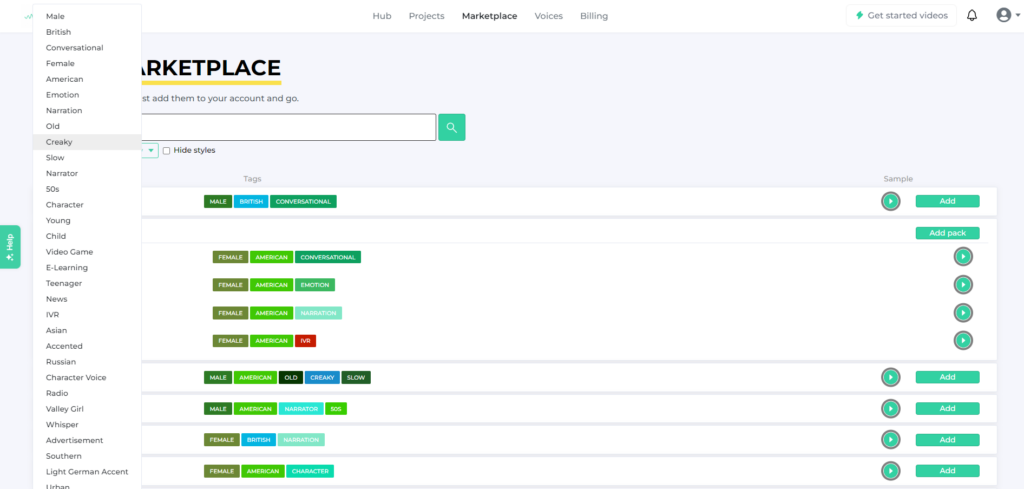
/divi:heading divi:paragraphResemble.ai’s marketplace offers a wide range of pre-built AI voices from which you can choose. You can filter voices based on various categories to find the perfect match for your ad. If your brand voice is more professional, we suggest using “Ed Smart” or “Gene Amora”. You can try using one of the new voices, “Tanja-Excited” or “John,” for a more fun vibe. There are many voices to choose from! Explore the Marketplace in a few easy steps:
/divi:paragraph divi:list- divi:list-item
- Access the Marketplace: From the dashboard, navigate to the “Marketplace” section. divi:list-item
- Filter Categories: Use the filters to narrow down your search.
- divi:list-item
- Preview Voices: Listen to voice samples to find the one that fits your ad’s tone and style. divi:list-item
- Select a Voice: Once you find a suitable voice, select it for your project. Add the voice and click on “Try it out.”

Generate Voiceovers
/divi:heading divi:list- divi:list-item
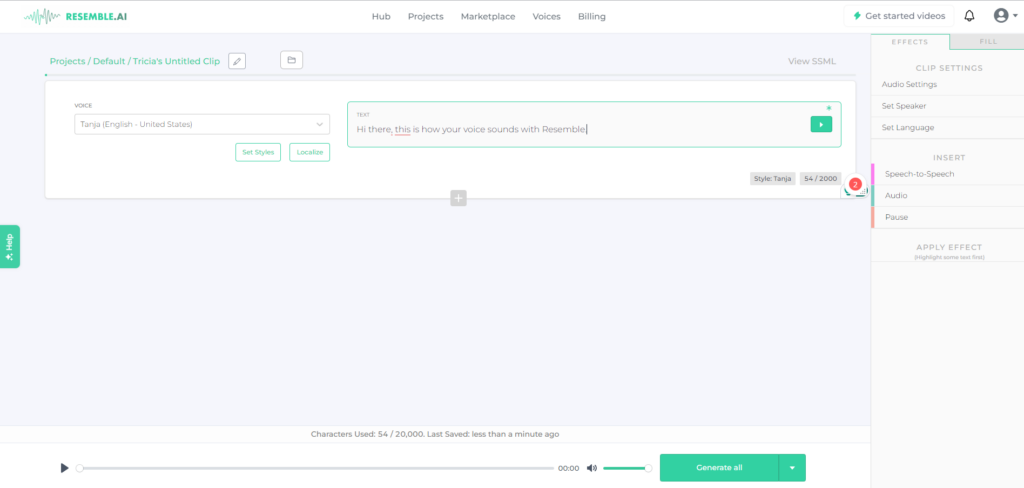
- Enter Your Script: Input the script you want to convert into a voiceover. divi:list-item
- Adjust Settings: Customize the voice settings, such as pitch, speed, and emotion, if needed. divi:list-item
- Generate Voiceover: Click “Generate” to create the voiceover. The system will process the script and produce an audio file. divi:list-item
- Review and Refine: Listen to the generated voiceover. If it needs adjustments, refine the settings and regenerate. settings panel is located on the right.
Download and Use
/divi:heading divi:list- divi:list-item
- Download Audio Files: Once satisfied with the voiceover, download the audio files in your preferred format (e.g., MP3, WAV). divi:list-item
- Integrate with Ads: Incorporate the voiceover into your ad creatives using various platforms like Canva. You can use it for video ads, radio spots, online ads, and more.
Tips for Choosing the Right AI Voice
/divi:heading divi:list- divi:list-item
- Understand Your Audience: Select a voice that resonates with your target audience. For example, a conversational tone might work well for casual products, while a narration style could be better for formal services. divi:list-item
- Match the Brand Tone: Ensure the voice aligns with your brand’s tone and personality. A brand with a youthful image might benefit from a Valley Girl accent, while a professional brand might prefer a British narration. divi:list-item
- Consider the Medium: Different mediums might require different voice styles. A video game might need a character voice like “Karl Nordman, Voiceover Viking,” while an e-learning module might need a clear and slow-paced narration like “Educational Liz.”
Using AI voices for ads on Resemble.ai can streamline your advertising process, making it more efficient and cost-effective. By leveraging the marketplace and its diverse range of voice options, you can find the perfect voice to improve your ads. Start exploring Resemble.ai today and transform your advertising strategy with cutting-edge AI voice technology.
/divi:paragraph.avif)