
Today, Microsoft named Resemble AI a certified third-party deepfake detection partner for Microsoft Teams at Microsoft Ignite 2026. Organizations running Teams can now deploy Resemble Meetings as a native Teams integration from the Teams admin center. This allows organizations to check whether the people on a call are real, whether they are who they claim to be, and whether the conversation shows signs of fraud.
Why Microsoft opened Teams to third-party deepfake detection
Microsoft added third-party synthetic audio and video detection to the Microsoft 365 roadmap on October 2, then updated its admin notice, MC1509787, on October 22 with a targeted release starting in mid November. Microsoft tied the feature to attacks that already run through Teams meetings, including AI impersonation, recruitment scams and fraudulent meetings built on synthetic identities.
Deepfake detection partners named at Microsoft Ignite
Microsoft discussed the program in Defend Against External Threats in Teams (BRK213), an Ignite breakout on Thursday, November 19 that explored how Teams is opening to certified third-party providers that detect deepfakes and impersonation attempts during meetings. Resemble AI is one of the featured partners, following the launch of our native Microsoft Teams integration on November 3, which is already live in production environments.
What sets Resemble AI apart among certified partners
Because each organization can choose their deepfake detection provider, it’s important to look beyond whether they can flag a deepfake. Certification lets a provider send deepfake detection signals into a meeting, and Resemble AI adds three additional capabilities security teams need once detection runs.
Identity matching on every meeting
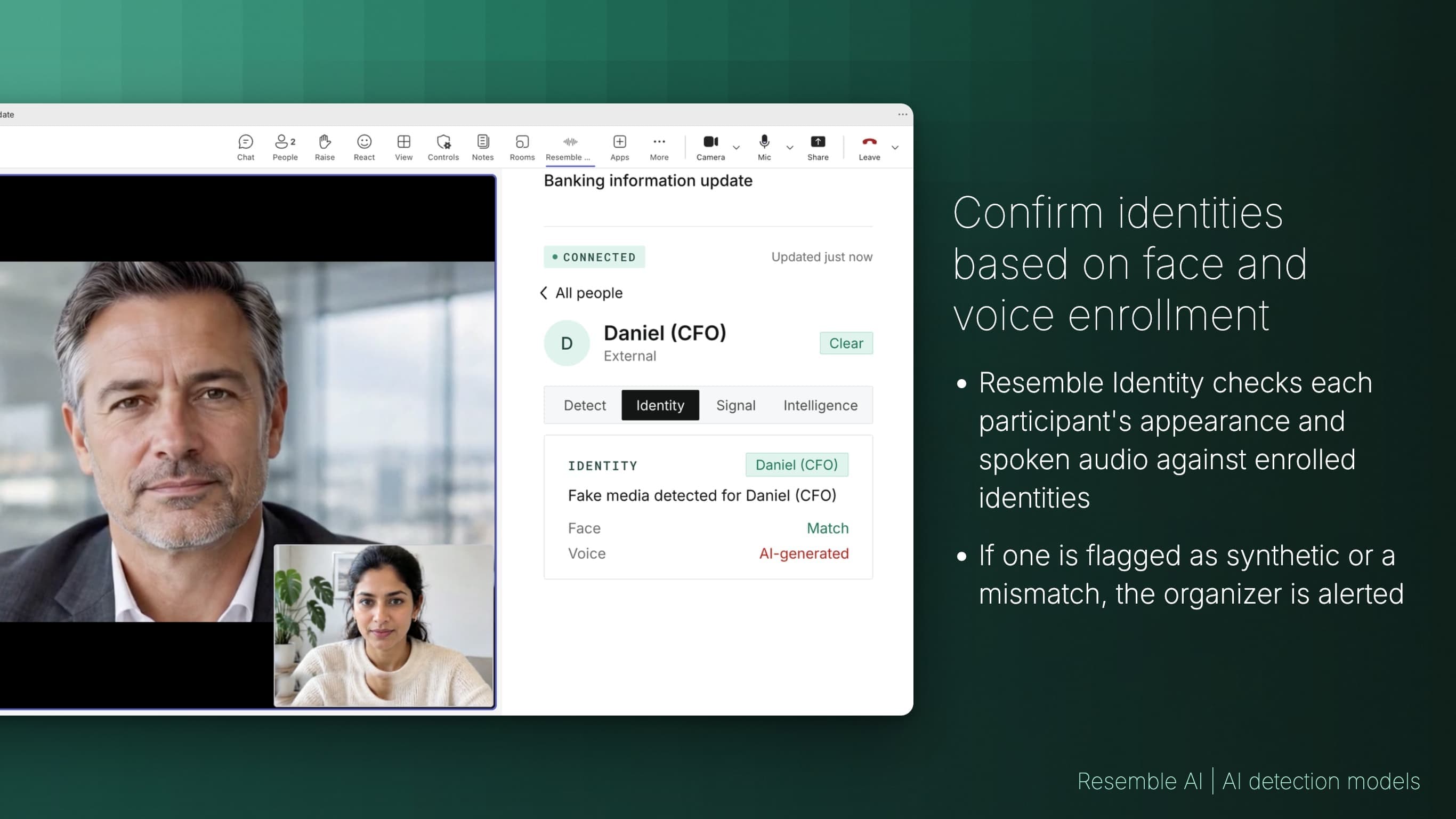
Identity matches each participant's face and voice against the identity enrolled to their Microsoft 365 account. It resolves identity once when someone joins and then continuously for the rest of the meeting, so it catches a person who swaps in halfway through a call as well as an impostor who joined at the start.
- In candidate fraud, Identity confirms the same person shows up for every interview round, which exposes proxy interviewees and stand-ins who take over after the opening minutes.
- In social engineering, Identity flags an attacker who passes the join check with stolen credentials, or who takes over an IT help desk call partway through, to the meeting organizer.
Fraud signals based on a custom reference library
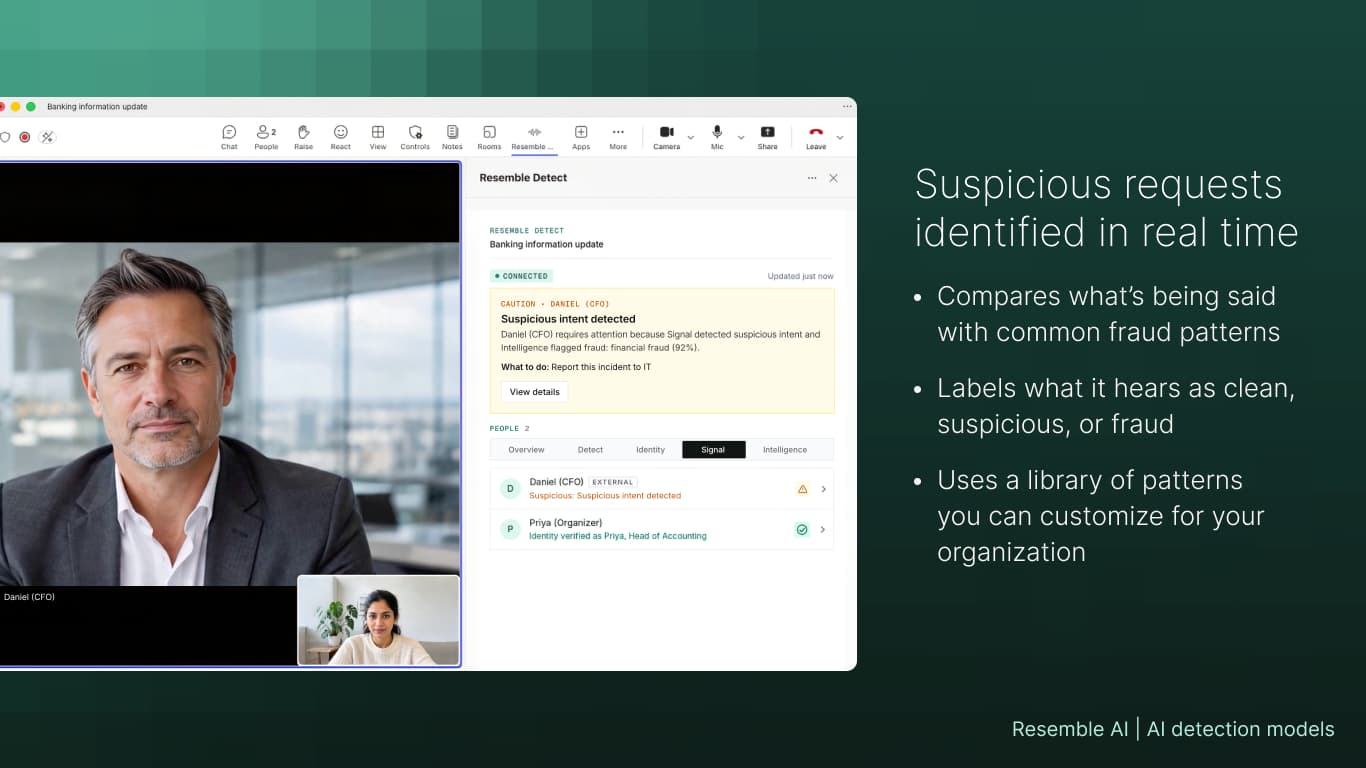
Signal detects fraud by pattern matching against a reference library, without recording the conversation. Security teams can add patterns to that library at any time, starting with the fraud attempts their organization has already faced, like a fake vendor asking to change bank details or a caller posing as IT to reset MFA. Resemble AI also recommends new patterns and ships updated libraries as add-on packs when attackers change tactics. When a call matches a known pattern, Signal labels it suspicious or fraud while the meeting is still running, even on calls with no deepfake at all.
Bot or botless detection, built for a variety of compliance needs
Admins configure how Resemble Meetings appears across their organization from the same Microsoft Marketplace listing, with three deployment options:
- Botless mode runs Resemble Meetings natively as a Teams app, so no extra participant appears in the meeting roster.
- Visible bot mode adds a named Resemble Meetings participant for organizations that want every attendee to see that detection is active.
- On-join mode sends a bot in only when a new attendee joins, checks that person, and leaves the meeting once the results are complete.
Along with these three, Detect alerts you to the presence of synthetic audio and video, and Intelligence explains every alert in plain language.
Coming next: deepfake detection in Microsoft Copilot
Deepfakes also reach employees as files and links, like a voice note forwarded in chat or a video attached to an urgent request. We are also about to launch the Resemble AI plugin for Microsoft Copilot, which analyzes media by upload or by link inside the same Teams experience or in the Copilot app, so employees can check suspicious content without leaving the tools they already use. We'll cover the full details in a dedicated post.
Get started with certified deepfake detection in Teams
If your organization runs hiring, payment approvals or help desk support over Teams, visit the Microsoft Teams integration page to see how certified detection works in your tenant, or install Resemble Meetings from Microsoft Marketplace. For use cases by team and the full deployment walkthrough, read how Resemble AI runs natively in Microsoft Teams.
Microsoft Teams deepfake detection FAQ
Which deepfake detection providers are certified for Microsoft Teams?
Microsoft certifies third-party providers to send synthetic audio and video detection signals into Teams meetings, and Resemble AI is a certified provider as of Microsoft Ignite 2026. Microsoft's admin notice asks admins to review each provider's terms, data handling and compliance documentation before enabling one.
How do I enable third-party deepfake detection in Teams?
Per MC1509787, admins select a supported provider, deploy its app through Manage apps in the Teams admin center, grant the required permissions and configure meeting policies. For Resemble Meetings, admins also choose botless, visible bot or on-join mode from the same Marketplace listing.
Which Teams clients support third-party deepfake detection?
Microsoft's roadmap entry lists Teams on Windows desktop, Mac and web.
Does Resemble Meetings record our meetings?
Resemble Meetings processes audio and video for detection and keeps media only for participants it flags, so your security team can review the event. Resemble AI does not use customer data to train its models, and it holds SOC 2 Type II certification.