
RESEMBLE AI PRESENTS
Deepfake 101
A practical guide to synthetic media: what it is, where it hits you, and the categories of defense that every company needs.
Introduction
Seeing is no longer verifying.
A computer scientist who has studied synthetic media for two decades made a prediction at the end of 2025 that reframes this year. Siwei Lyu, who directs the Media Forensics Lab at the University at Buffalo, wrote that voice cloning had crossed what he called the indistinguishable threshold: a few seconds of audio is enough to clone a voice convincingly enough to fool ordinary people, and in some cases even institutions. His outlook for 2026 is blunt — as the tools move toward real-time, reactive deepfakes, more people are going to get fooled by fakes they had no way to catch. 1
The people (or agents, in some cases) in your organization who approve payments, reset credentials, and vouch for a colleague on a video call rely on a skill that no longer works: recognizing a familiar face and voice. Fakes have improved faster than the defenses against them, and that gap is where the losses are happening.
If you lead security, fraud, or risk, you already know deepfakes are a problem. What is usually missing is a map. This guide gives you one: what these things are, where they actually hit an organization, why the tools you already own do not catch them, and the four categories of defense that do. By the end you should be able to walk into a vendor meeting and ask the questions that matter.
How to read this guide
- PART 1 — Defines deepfakes, traces where they came from, and sizes the problem.
- PART 2 — Breaks down the ways a fake reaches you.
- PART 3 — Shows where deepfakes hit a business, with real 2025 and 2026 incidents.
- PART 4 — Explains why your existing stack does not see them.
- PART 5 — Shows how to actually spot one, and what detection looks like.
- PART 6 — Lays out the four-layer defense framework for a comprehensive approach.
Part 1 — What is a deepfake?
To understand what a deepfake is, let us start with the word itself. Deepfake combines deep learning (made with AI) and fake. It is media audio, image, or video that has been generated or altered with AI to deceive, mislead, or depict someone without their consent. The deciding factor is intent and consent. This matters because not all AI-generated media should be considered a deepfake.
If a company clones a voice with permission, or a creator uses AI to polish an image and they are transparent about it, that is using AI as a creative tool, not a deepfake. The distinction is not whether AI was used, but whether it was used to deceive.
When “AI or not” is the only answer you need
Intent and consent define a deepfake, but sometimes all that matters is whether you're interacting with AI at all. Underneath the definition sits a simpler question, and it is often the most important one: does this experience match what you were relying on?
For example, when you answer a call where you expect a real person, knowing whether the voice is real or not changes how you should treat everything that follows. Or when you decide whether to accept a photo as proof of damage, knowing whether the damage you see is real can form the basis of your entire decision.
Your expectation conflicting with what you actually receive can be the make-or-break factor, and human judgment on how to handle the situation is still very much a requirement. Deepfake detection makes that factor transparent, so you can make the best judgment on how to proceed.
A short history: where deepfakes came from
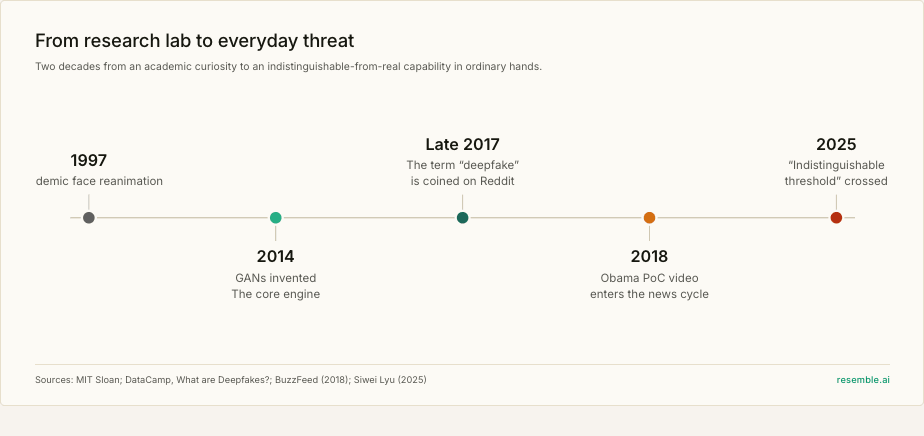
The idea is older than the word. Researchers were reanimating faces in video as far back as the late 1990s, but the modern era began in 2014, when a machine learning PhD researcher at the Université de Montréal, Ian Goodfellow, and his colleagues introduced the generative adversarial network, or GAN: two AI models, one forging an image and one judging it, each pushing the other toward realism. GANs are the engine under almost every early deepfake.
The word itself arrived in late 2017, when an anonymous Reddit user calling themselves “deepfakes” began posting face-swapped videos and sharing the code. Reddit banned the forum in early 2018, but the tools were already on GitHub and spreading. A few months later, a BuzzFeed video of a synthetic Barack Obama, voiced by Jordan Peele, became the first deepfake to break into the global news cycle — equal parts demonstration and warning. From there the story is one of falling cost and rising realism, until 2025, when researchers began describing high-quality fakes as having crossed the indistinguishable threshold. 2
A short history: how fast deepfakes multiplied
Counting deepfakes online is imprecise, and different trackers measure different things, but every credible source describes the same shape: a curve that bends sharply upward. One widely cited series tracked roughly 14,000 deepfake videos in 2019, growing into the hundreds of thousands by 2023, then to an estimated 8 million pieces of synthetic media circulating in 2025. The growth rate has been estimated near 900 percent a year. 3
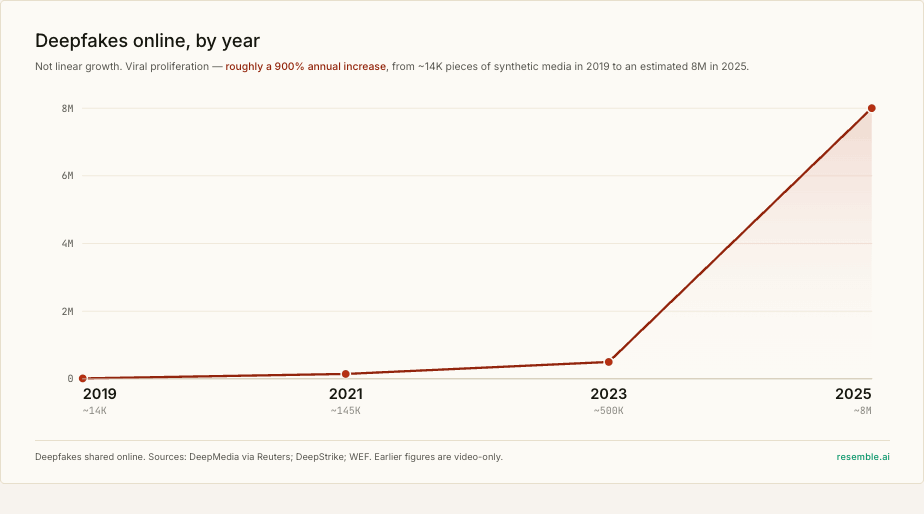
Read that curve as the backdrop to everything else in this guide. The defenses described later are not responding to a stable problem. They are trying to keep pace with a volume that has roughly doubled and redoubled, year after year.
Figures: see Sources 4–7.
Figures: see Sources 8–9.
The advice most people still carry is already out of date. Henry Ajder, an independent generative-AI researcher widely quoted on this, points out that the giveaways shift every few months as the tools improve, and that careful prompting can erase the ones that remain. The threads where people post a clip and ask the crowd “is this real?” are growing for a reason: the honest answer is getting harder to give. 8 9
Part 2 — The ways a fake reaches you
Deepfakes are not one threat. They arrive through a handful of distinct techniques, and this guide covers three prevalent media types audio, image, and video each with its own tooling and its own detection challenge. Knowing which one you are most exposed to is the first step toward covering it.
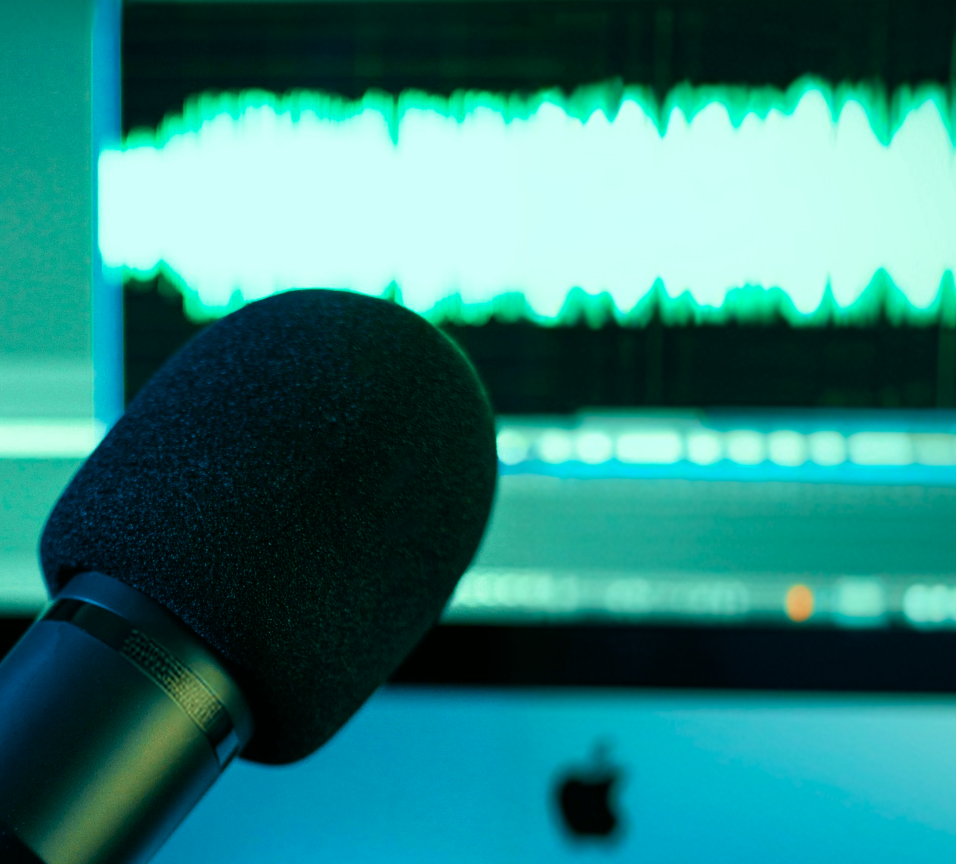
Audio
| What it is | A synthetic copy of a voice, built from as little as ten seconds of audio. |
|---|---|
| How it reaches you | A phone call or voicemail carrying an urgent instruction. |
| How it’s possible | Every earnings call, keynote, and podcast your executives recorded is training data on the open internet. |
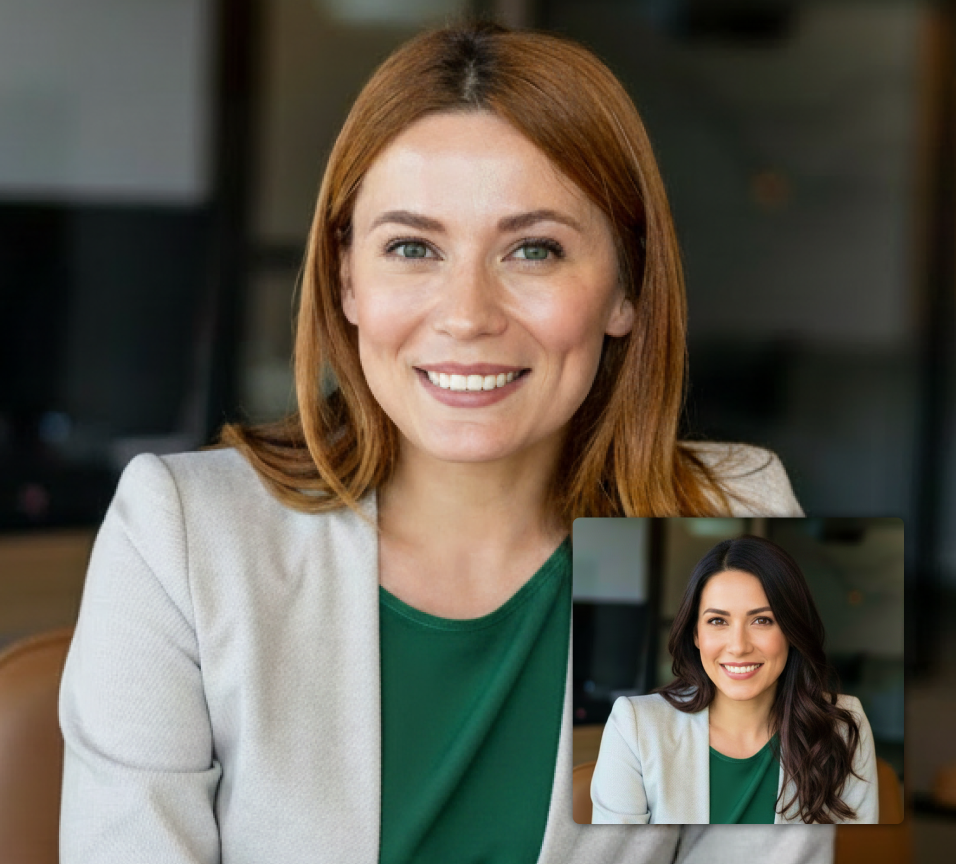
Video
| What it is | One person’s identity mapped onto another’s body, or onto a live video feed. |
|---|---|
| How it reaches you | A low-resolution video call where the face looks right enough to pass. |
| How it’s possible | A few minutes of conference or social footage is enough to build a swap that survives a call. |
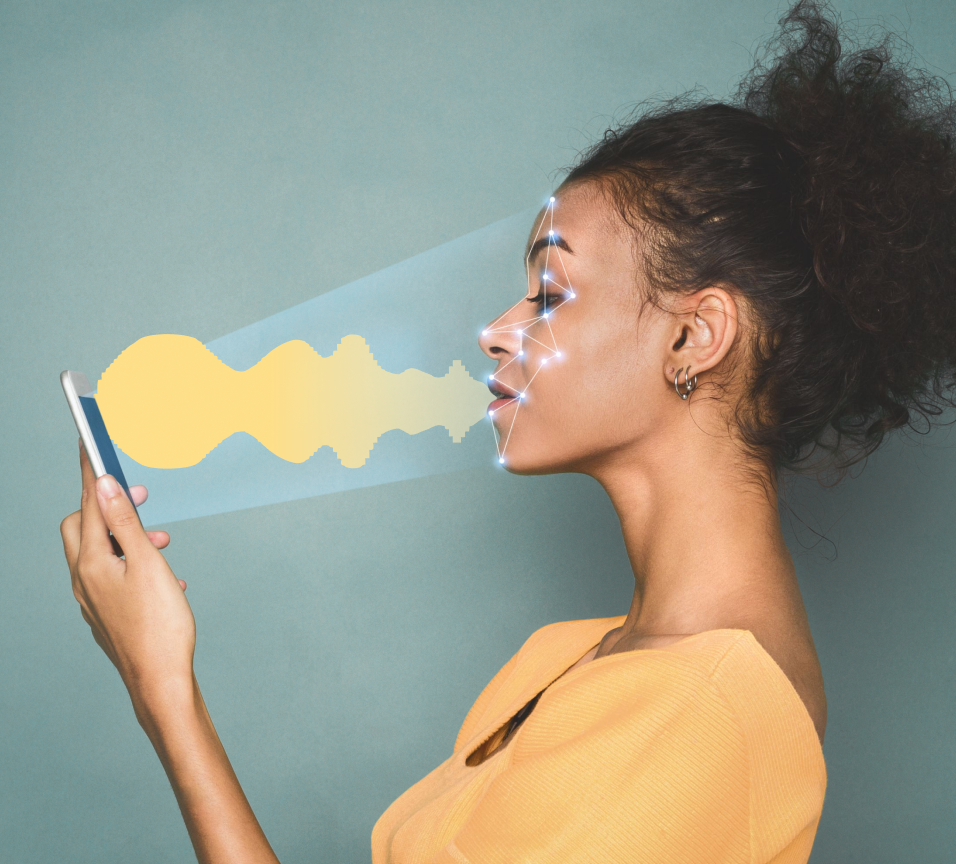
Audio + Video
| What it is | Generated facial movement, expression, and speech — sometimes several synthetic people in one call. |
|---|---|
| How it reaches you | A scheduled video meeting that looks completely normal. |
| How it’s possible | It overrides the instinct that a live face is proof of a real person. |
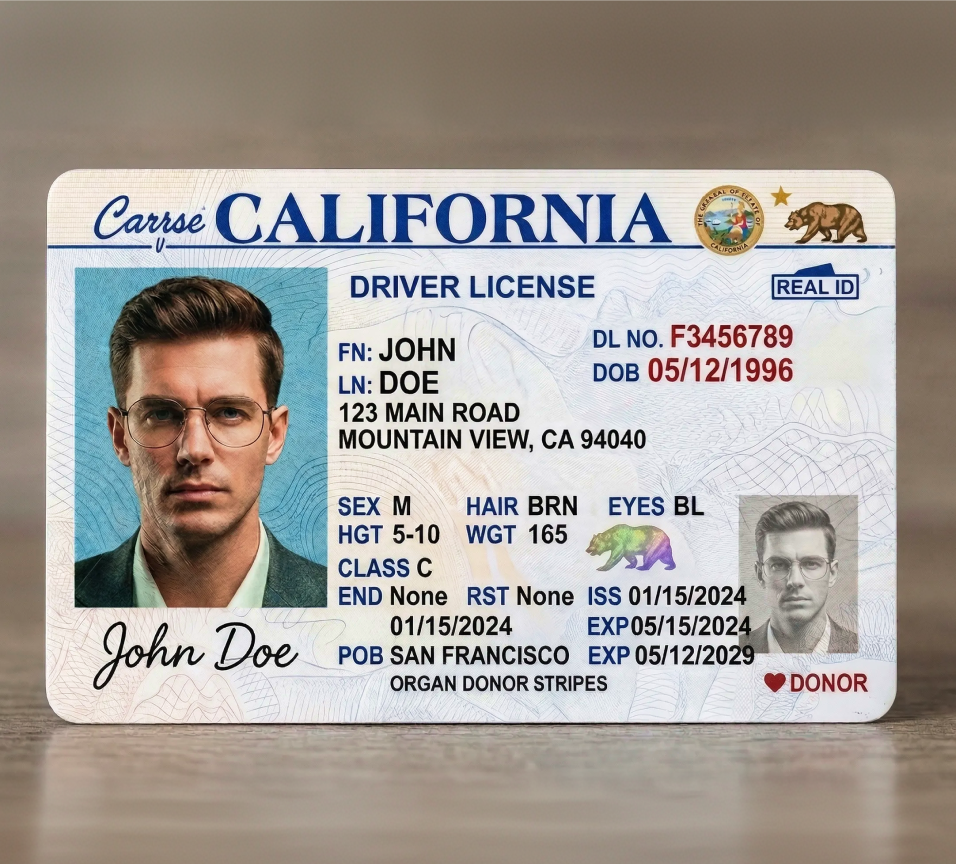
Image
| What it is | Static synthetic images, fabricated documents, or a wholly invented person. |
|---|---|
| How it reaches you | A fake endorsement, a manipulated claim, or a synthetic applicant in your hiring funnel. |
| How it’s possible | Persona kits bundle a face, a voice, and a backstory tuned to pass verification. |
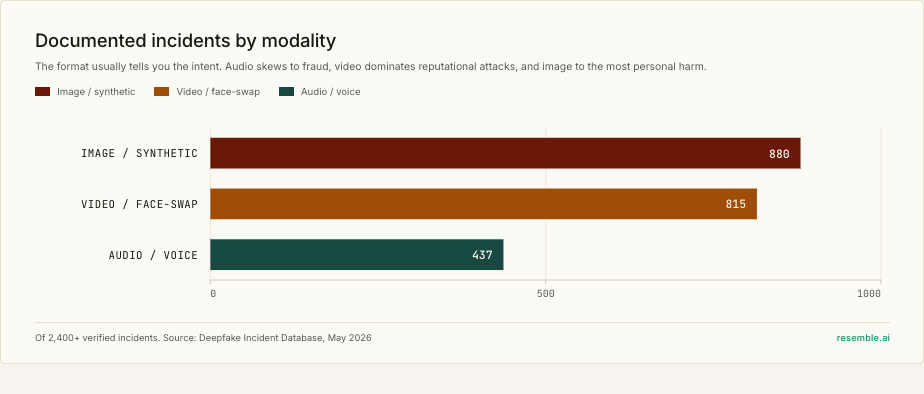
CHEAT CODE: When a colleague describes a deepfake incident, ask one question first: which modality? Audio, video, or image. The answer tells you which control would have caught it. Most organizations have none of the three covered, so the gap is rarely awareness.
Part 3 — Where deepfakes actually hit you
The modalities describe how a fake is made, but the more useful question for a security or fraud team is where it lands. The documented incidents cluster into a handful of recurring patterns, and each one below pairs the pattern with a real case.
Executive impersonation and payment fraud
The highest-value pattern. An attacker clones a senior leader's voice or face, then uses the borrowed authority to push through a payment or a credential reset. The finance function is the target because it is the shortest path to money.
Investment scams using public figures
The highest-volume pattern by share of losses. Attackers generate video of a recognizable figure — a politician, a finance minister, a billionaire — endorsing a fraudulent investment or crypto platform, then run it as social advertising to reach the widest pool of victims.
Hiring and synthetic-identity fraud
A fully fabricated candidate — with a face, a voice, and a resume — clears a remote interview and gets hired. Some are after a salary; others are after access to sensitive documentation. This is the fastest-growing organizational pattern, and it pulls HR into the security perimeter.
Marketplace and dispute fraud
The pattern that scales to anyone with a phone. Marketplace and gig-economy platforms were built on the assumption that a submitted photo is proof of something real, and consumer AI image tools broke it. A faked damage photo or counterfeit receipt now costs nothing to generate and slots into a dispute system never designed to question it exposing every platform that takes a photo as evidence: rideshare, delivery, rentals, insurance claims.
Consumer and family impersonation
Not every target is an enterprise. The same voice-cloning tooling powers the grandparent scam at industrial scale: a cloned voice of a relative in apparent distress, demanding money fast.
Public sector and electoral manipulation
The highest-stakes pattern for public trust. The target is the information environment itself: synthetic video and audio of candidates and officials, deployed to swing an election or simply flood a feed with enough fakes that people stop trusting anything. Research cited in the case below put human accuracy at spotting such fakes at roughly 55 percent — barely better than a coin flip.
Reputation, brand, and personal harm
Synthetic media is also a weapon against reputation: fabricated statements from executives, fake brand endorsements, and non-consensual imagery targeting both public figures and private individuals. This is the pattern that pulls communications, legal, and HR into what used to be a purely technical problem.
CHEAT CODE: Map these patterns onto your own org chart before you evaluate any tool. Finance owns payment fraud and investment-scam impersonation, HR owns hiring fraud, comms and legal own reputation, and customer-facing teams own marketplace and support-desk fraud. If a pattern has no clear owner, that gap is exactly where an attack will land because nobody is watching it.
Part 4 — Why your existing stack does not see this
Security teams have spent two decades learning to distrust suspicious emails, and those defenses work because phishing leaves consistent, auditable signals. Your stack inspects systems: headers, reputation, payloads, endpoints. It is very good at the layer it was built for.
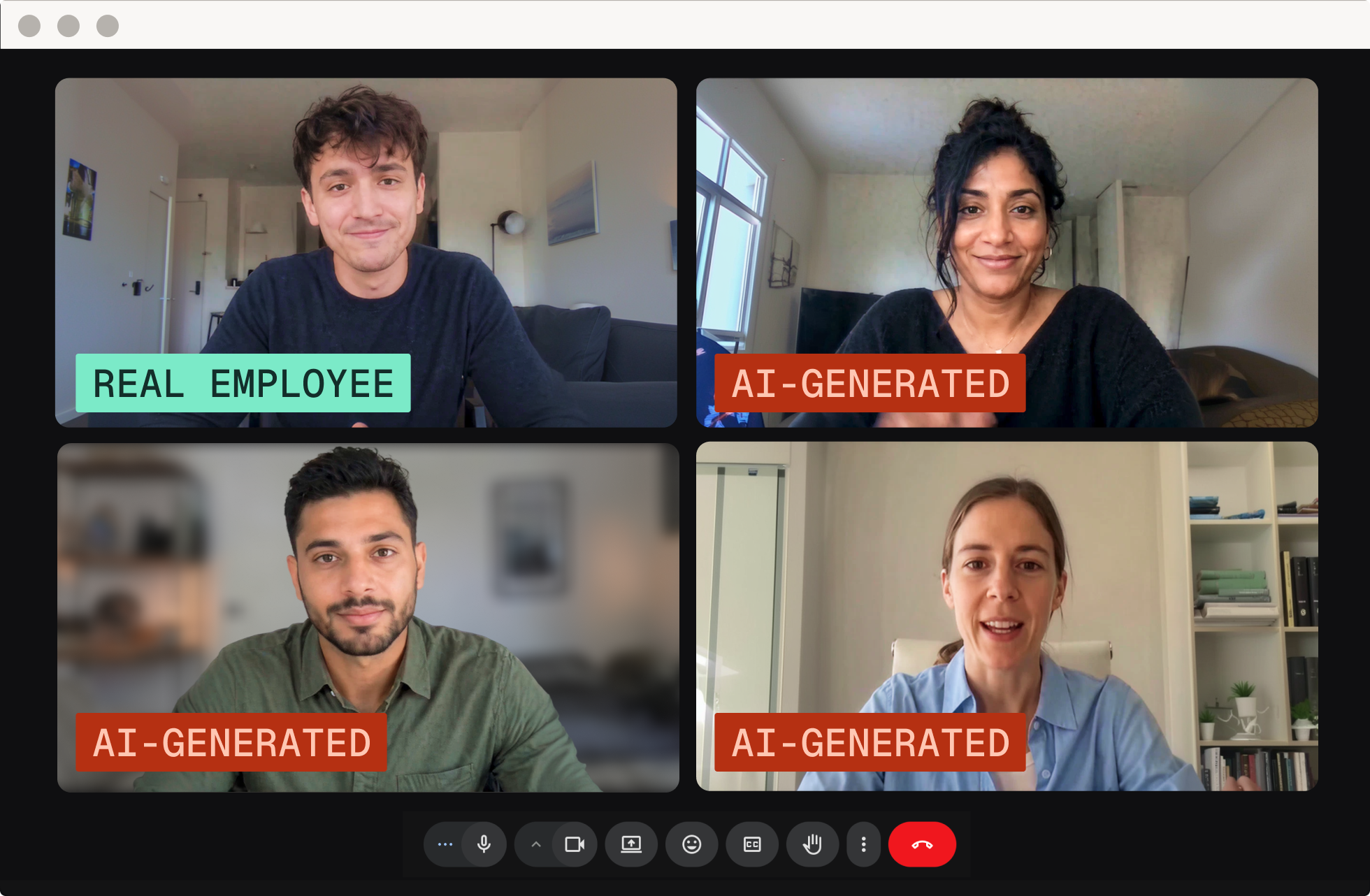
But deepfakes attack a different layer. Picture the wire transfer in the $25 million Arup case:
- It was authorized by a real employee, not an intruder.
- On a real device, over a legitimate connection.
- In response to people the employee believed they recognized.
There was no malicious payload to quarantine and no bad domain to block. The attack landed at the human layer of trust — and that is where most stacks have the least coverage.
As of June 2026, Gartner ranks identity impersonation using deepfakes among the four critical threats security leaders must urgently address, noting that generative AI has sharply increased the volume, fidelity, and accessibility of deepfakes across voice, video, and images, whether pre-recorded or generated in real time. 17
Phishing erodes systems you trust, such as your bank or your IT helpdesk. Deepfakes erode trust in your own senses: can you believe what you see or hear? Your defenses have to match the attack surface, and most stacks defend only one of these two. The point is not that phishing defenses failed — the new attack surface simply sits outside their range, and it keeps expanding: every new channel where you trust a face or a voice is one more place a deepfake can arrive.
THE NUMBER THAT SHOULD MOVE BUDGET
Gartner has warned that by 2026, 30 percent of enterprises will no longer consider identity verification reliable on its own because of AI-generated deepfakes. 18
There is a deeper reason the defenses lag. A 2026 analysis of 438 academic detection papers found that research has concentrated on detecting deepfakes of public figures, while the categories causing the most documented harm — voice-clone fraud and non-consensual imagery remain the least studied. 19
Part 5 — How to actually spot one
So what gives a deepfake away? For years the answer was a checklist of visual glitches anyone could run. That era is mostly over, and understanding why is the key to understanding what modern detection actually does.
The human tells are dying
The advice you have heard — count the fingers, watch for unnatural blinking, look for the warped ear — still works on low-effort fakes. The problem is that every one of these tells is a bug that the next generation of models fixes. Independent researchers who track this caution that the giveaways shift every few months, and that careful prompting can erase the ones that remain. A few signals still worth a human glance:
- Skin and texture: an over-smoothed, polished sheen, or skin whose age does not match the hair and eyes.
- Light and shadow: reflections and shadows that fall in directions the scene does not justify.
- Edges and hands: warping around hairlines and ears, and hands that merge, distort, or gain a finger.
- Audio-visual sync: lips that lead or lag the sound, or a voice that sounds faintly flat or distant.
Treat these as a first glance, not a verdict. The honest position, shared by the academics who build these tools, is that catching a modern deepfake reliably is a human-and-algorithm job. The human brings context; the algorithm sees the things a human eye cannot.
What machine detection sees that you cannot
A detection model is not counting fingers. It is examining the signal itself for the statistical fingerprints that generation leaves behind — the artifacts no human eye registers:
- In audio: unnatural prosody, timbral inconsistencies, and spectral patterns characteristic of a synthesis model.
- In video and images: lip-sync irregularities, skin-texture anomalies, lighting that is internally inconsistent, and rendering failures in hard-to-generate regions like hands and background faces.
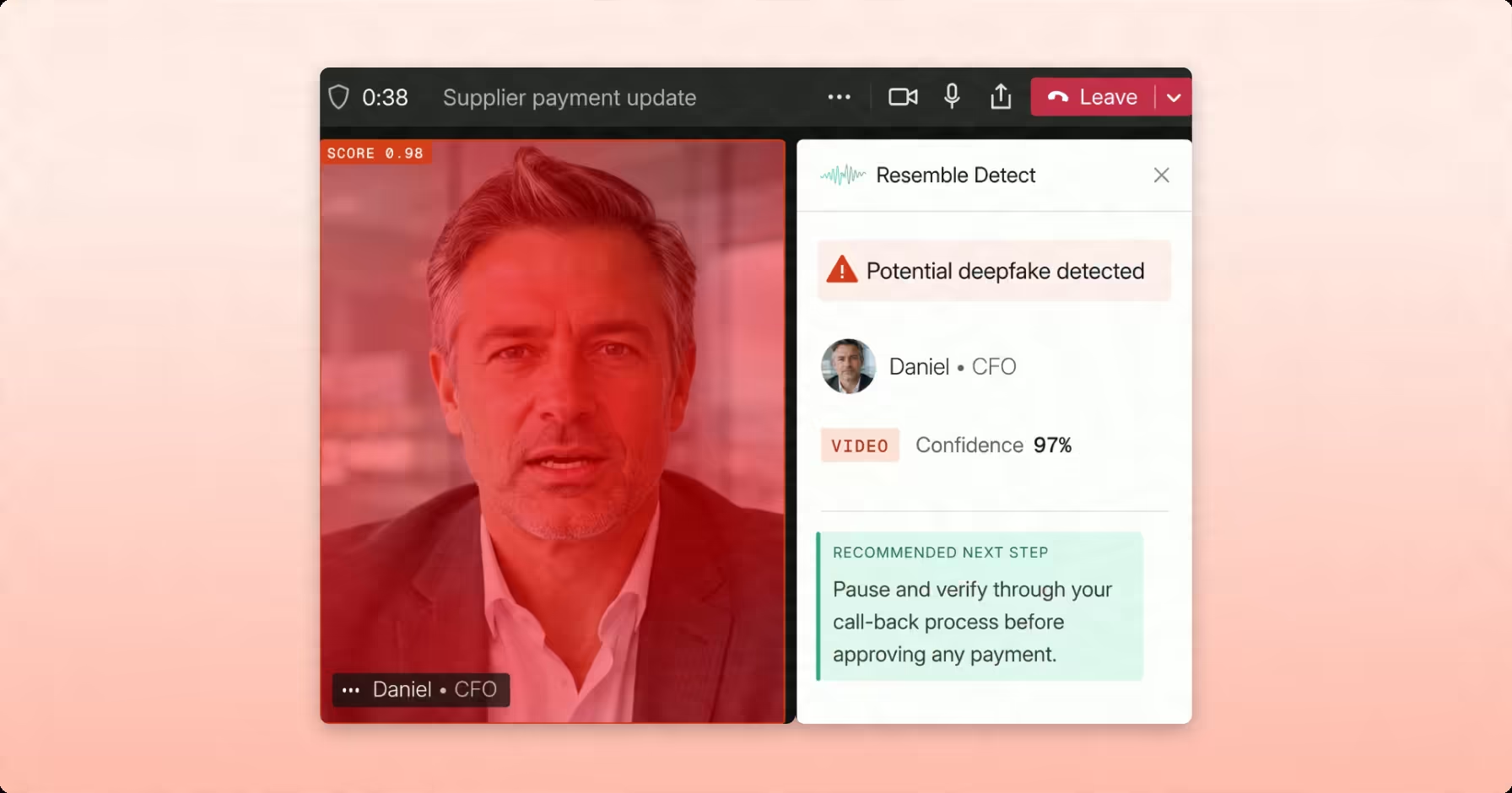
The strongest detection is multimodal: it cross-references audio against video, so a real-looking face paired with a cloned voice still trips the flag. The output is usually a confidence score per modality and a binary label.
From a bare score, modern detection moves to a forensic case in three steps:
- Detect — the model returns a confidence score and a label for each modality.
- Analyze — the system decomposes the result into the specific artifacts that triggered it, the likely fraud type, and whether a live person was present (liveness).
- Explain — it assembles a structured, human-readable report with the evidence and an audit trail, often including a visual heatmap that highlights exactly which regions drove the verdict.
CHEAT CODE: When you evaluate detection, do not stop at the accuracy number. Ask what the result tells you beyond a score. Does it name the artifacts? Identify the fraud type? Confirm whether a live person was present? Produce an audit trail you could hand to legal? A score flags content. An explanation lets you act on it and defend the decision later.
Part 6 — The four layers of defense
Every credible defense against synthetic media falls into one of four categories. They answer different questions, and a mature program needs all four, because each one fails in a way the next one covers.
Layer 1 — Identity verification: is a real human present?
This layer asks whether a live, genuine person is on the other end of an interaction. It is liveness detection, biometric matching, and continuous authentication: the front door for banking, onboarding, and account recovery.
- Works when: a synthetic persona tries to open an account or recover access at a checkpoint you control.
- Fails when: attackers skip the camera and inject pre-recorded or synthesized video through virtual cameras and emulated devices.
Visual liveness assumes a real camera points at a real face. Injection attacks break that assumption, which is why Gartner now tells enterprises that verification alone is no longer enough.
Layer 2 — Provenance and watermarking: where did this come from?
Provenance flips the problem. Instead of detecting a fake after the fact, it proves authenticity at the moment of creation. Two technologies share the layer:
- C2PA / Content Credentials: a cryptographic record of origin attached to a file — the digital equivalent of a nutrition label.
- Watermarking: an imperceptible, machine-readable signal embedded directly in the audio or pixels.
Because the two work separately, a file can clear one and never touch the other. C2PA metadata is fragile, since most platforms strip it during upload and a screenshot erases it entirely. That fragility is why the EU's own Code of Practice for the AI Act requires pairing metadata with imperceptible watermarking that survives what metadata cannot.
CHEAT CODE: Provenance proves a claim was made, not that it is true. A credential confirms a file came from a device without confirming the device pointed at something real. Treat provenance as a chain of custody, not a lie detector, and never rely on it alone for content arriving from outside your own pipeline.
Here is why that matters for detection. If your organization watermarks its real content consistently, you create a reference point you control. When a video of your CEO surfaces, the first question becomes simple: does it carry your watermark? If it does not, that absence is itself a signal. Provenance does not just label what is AI — it lets you prove what is authentically yours, so anything impersonating you stands out.
COMPLIANCE CHECK
EU AI Act Article 50 transparency obligations for AI-generated content begin August 2, 2026. California SB 942 already took effect in January 2026. If you publish AI-generated content publicly, the provenance layer is no longer optional, and metadata alone will not satisfy the multi-layer marking regulators now expect.
Layer 3 — Detection: is this a deepfake?
This is the layer most people picture when they think about catching deepfakes. It is the only one of the four that works on content you didn't make and cannot trace, and most attacks fall into this category. Detection looks at the content itself and flags the signs that it was generated or altered to deceive.
- Works when: it is multimodal and paired with explainability, so you get a defensible verdict, not just a score.
- Fails when: it meets a generator it was never trained against. Some detectors are only as current as the models they have seen.
CHEAT CODE: The single most useful question you can ask a detection vendor is how often the models are retrained. New voice, face, and video generators launch constantly, and each is a new attack vector. A model last updated six months ago is not protecting you from this month's tools.
Layer 4 — Response and monitoring: where is our identity being faked?
The first three layers handle content in front of you. The fourth handles content you have not seen yet. Monitoring should scan chosen channels, or even the open web, for synthetic media using your executives, brand, or people — and response turns a discovery into action:
- Alerting: routing the discovery to the right internal team before it spreads.
- Evidence: generating a shareable pack for platforms or legal.
- Takedown: submitting the removal request to the platform.
Its limit is honest: monitoring acts after a fake exists. It cannot prevent creation, and it depends on the detection layer beneath it to judge what it finds. This is the layer that brings comms, PR, and legal into the response.
THE FOUR QUESTIONS TO ASK ANY VENDOR
1. Which of the four layers do you actually cover, and which do you only partner for? 2. How often are your detection models retrained against new generation tools? 3. Do you handle audio, video, and image, or only one modality? 4. Can you show me the evidence behind a verdict, not just a score?
The shape of a defense
Deepfakes come in many forms and turn up everywhere, from the finance team to the hiring process to your customers' feeds. Defending against them takes four things working together:
- Confirming a real person is there.
- Proving where content came from.
- Spotting a deepfake when one reaches you.
- Watching for fakes of you out in the world.
The old instinct that seeing is believing doesn't hold anymore.
This isn't only a company problem, either. The same attacks hit people in everyday life, which is why deepfakes are everyone's concern, not just the enterprise's.
This guide is a way of thinking about the problem: every organization has to draw its own line between a deepfake and a fair use of AI. The technology was never the threat; the misuse is. The real work is deciding ahead of time what misuse looks like for you, so you can spot it when it shows up.
Our featured image - the story behind her
Our image of Lady Justice was created with Nano Banana from Gemini and then altered in Figma with additional Nano Banana editing and various style plugins. Is she a deepfake? By the matrix in Part 1, no. Lady Justice is allegorical — no real subject, no intent to deceive, AI used openly as a creative tool. Clear.
But ask whose aesthetic trained the model that made her, and it gets murkier. The matrix captures consent around the subject of synthetic media. It has no column for the artists whose styles were absorbed without asking.
That's not a flaw in the deepfake definition — it's a separate, still-unsettled question. We included her on the cover because she's a useful edge case: technically clean, philosophically open. Which is exactly the kind of thinking this guide is designed to help you do.
About Resemble AI
Resemble AI is generative AI security that gives organizations the tools to verify, detect, and act on synthetic media threats anywhere they appear. Built on our foundational detection model, Resemble provides a layered trust stack that turns model output into decisions companies can understand, audit, and defend. Founded in 2019, Resemble AI is trusted by global enterprises and government agencies to secure the full lifecycle of synthetic media across audio, video, image, and text. Learn more at resemble.ai.
Sources
- Siwei Lyu on voice cloning crossing the “indistinguishable threshold.” The Conversation / Fast Company, “Deepfakes leveled up in 2025,” Jan–Feb 2026.
- History of deepfakes (term coined on Reddit, late 2017; GANs, Goodfellow et al., 2014; BuzzFeed / Jordan Peele Obama video, April 2018). MIT Sloan, “Deepfakes, explained”; DataCamp, “What Are Deepfakes?”
- Volume growth, ~14,000 in 2019 to ~8M in 2025 (~900% annual growth). DeepMedia via Reuters; DeepStrike, “Deepfake Statistics 2025”; World Economic Forum. Counts are estimates; methodologies differ; earlier figures are video-only.
- Gartner, “Gartner Survey Reveals Generative AI Attacks Are on the Rise,” Sept 22, 2025. Survey of 302 cybersecurity leaders across North America, EMEA, and Asia/Pacific, conducted March–May 2025.
- Gartner, same survey as above (69% of attacks against video, 67% against voice systems).
- Deepfake volume, ~500K in 2023 to ~8M in 2025. DeepMedia, cited by the World Economic Forum, 2025.
- FBI Internet Crime Complaint Center (IC3), 2025 Internet Crime Report, April 2026. AI-related losses tracked for the first time, ~$893 million.
- Everyday encounter rate (3.5 deepfakes/day, ages 18–24) and AI voice-scam exposure. McAfee, “State of the Scamiverse,” survey of 5,000 adults, 2024–25.
- Henry Ajder on visual “tells” shifting as models improve. Independent generative-AI researcher; quoted widely, including BBC and AP, 2024–2026.
- Arup deepfake video-call fraud: ~$25.6 million (HK$200M) across 15 transfers, Hong Kong finance employee, January 2024; firm confirmed via CNN, May 2024. Hong Kong Police.
- North Korean IT-worker schemes inside 130+ US companies using stolen identities and AI personas. US DOJ, FBI, and CISA advisories, 2024–2026.
- Ontario senior loses $900,000 to a crypto scam using a deepfake video of Mark Carney, June 2026. CTV News and CP24.
- Marketplace fraud, Lyft / Boca Raton AI damage-photo case, May 2026. BocaNewsNow, May 18, 2026.
- Electoral / public-sector manipulation, BBC Panorama investigation into overseas AI video networks (55% human-detection accuracy), May 15, 2026. BBC.
- Bay Area AI voice-clone “virtual kidnapping” case, May 2026. Local news reporting via the Deepfake Incident Database.
- Jill Salt deepfake harassment case (Staffordshire councillor resigns after sexualized deepfake videos and impersonation), June 2026. BBC and Yahoo News.
- Gartner, “Gartner Identifies Four Critical Threats Requiring Urgent Improvements from Cybersecurity Leaders,” press release, June 2, 2026.
- Gartner, “Predicts 2024 AI & Cybersecurity,” cited in “Gartner Predicts 30% of Enterprises Will Consider Identity Verification and Authentication Solutions Unreliable in Isolation Due to AI-Generated Deepfakes by 2026,” Feb 1, 2024.
- Analysis of 438 academic detection papers showing research concentrated on public-figure deepfakes while NCII and voice-clone fraud remain understudied. Raza et al., “The Deepfakes We Missed,” arXiv:2605.12075, May 2026.