
The FBI's 2025 Internet Crime Report attributes more than $30 million in Business Email Compromise (BEC) losses specifically to attacks with a confirmed AI component, with fraudsters increasingly combining email, phone calls, and video meetings to increase the credibility of payment diversion requests.
Generative AI adds another layer of complexity to an already established BEC threat. Attackers can now pair spoofed emails with cloned voices or synthetic video, making fraudulent payment requests appear significantly more convincing.
A request may now come through a clean email, a familiar invoice thread, or a voice message that sounds like someone your team already knows. AI-generated voice cloning and deepfakes are making vendor impersonation attacks significantly more convincing by allowing attackers to mimic trusted contacts across email, phone, and video.
This guide distills your core challenges into a focused compliance checklist, giving your team concrete steps to verify vendors and flag suspicious requests early.
Key Takeaways
- The attack is multi-channel, not just email: Vendor fraud arrives by email, phone, fax, text, and video call. Defending only one channel leaves the rest open.
- A familiar voice is no longer proof of identity: Voice cloning tools work from seconds of audio. Speaker verification and out-of-band confirmation both need to happen.
- Payment detail changes are the highest-risk moment: New banking details on a known invoice are the most common loss trigger. Every change deserves a verified callback.
- One approver is one vulnerability: Dual controls, separated roles, and approval thresholds stop rushed decisions before they become irreversible wire transfers.
- Attackers research before they strike: Vendor names, payment cycles, and org details are publicly available. Limiting that exposure reduces how convincing an attack can become.
What Is Vendor Impersonation Fraud?
Vendor impersonation fraud is a specific form of phishing and a direct subset of Business Email Compromise (BEC). Fraudsters impersonate existing vendors to hijack legitimate payments by substituting real banking details with fraudulent ones.
The organization ends up paying the scammer rather than the vendor, and the fraud often goes undetected until the real vendor flags the missing payment. The threat landscape has become more sophisticated as generative AI enables increasingly realistic voice cloning, synthetic media, and automated phishing content, making impersonation attempts harder to identify.
A spoofed email, a cloned voice note, or a fabricated invoice thread can all carry the same fraudulent request.
How Do Scammers Impersonate Legitimate Vendors?
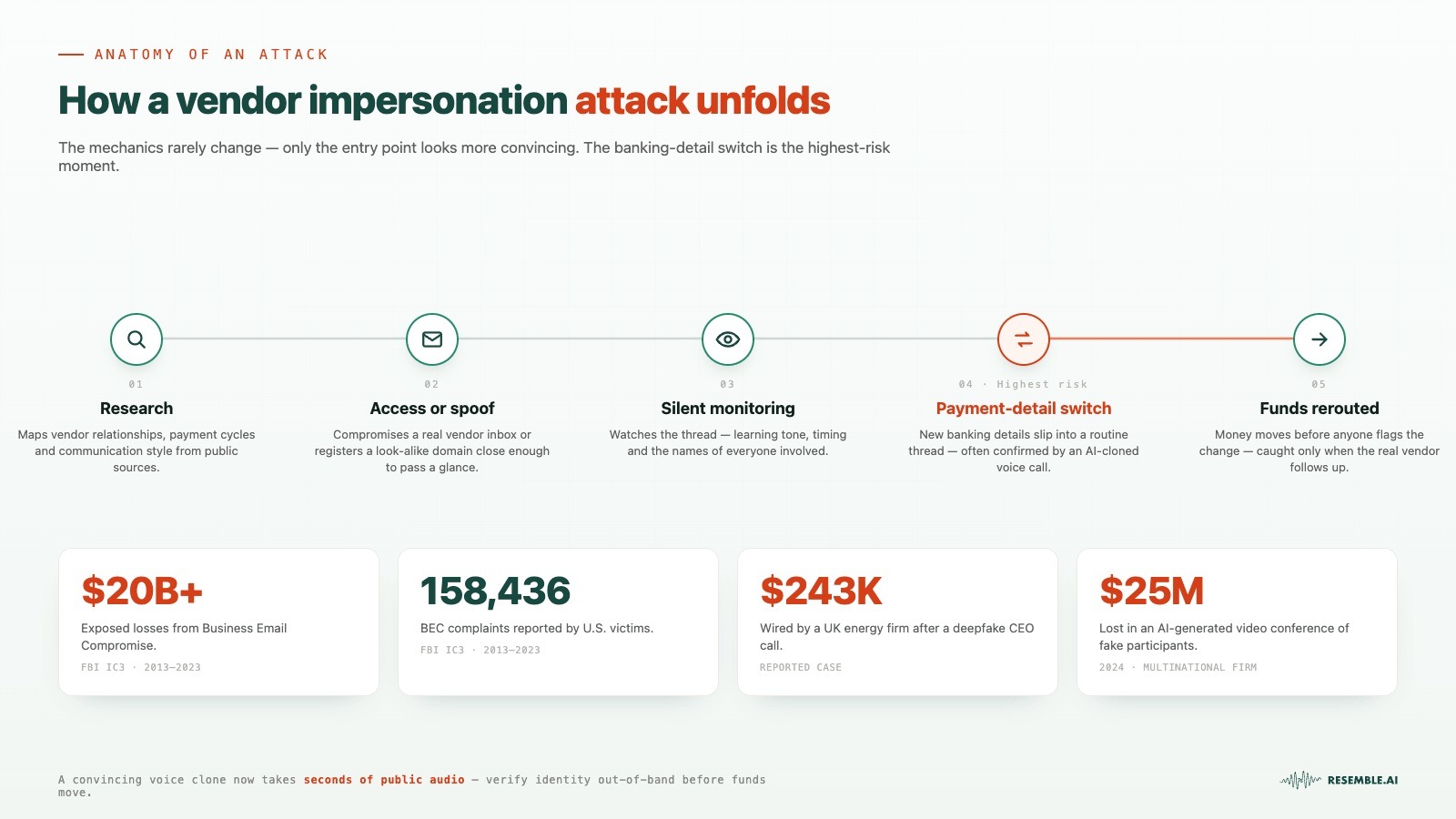
The pattern behind vendor impersonation fraud has not changed much over the years. What has changed is how convincing the entry point looks today.
A fraudster typically starts by researching the target organization. They study vendor relationships, payment cycles, and communication styles. From there, the playbook runs like this:
- Account access or spoofing: The attacker either compromises a real vendor email account or creates a spoofed address that looks close enough to pass a quick glance.
- Silent monitoring: They observe the communication thread, learning tone, timing, and the names of people involved.
- The payment detail switch: At the right moment, they request an update to banking information inside what looks like a routine exchange.
- Funds rerouted: The payment goes out before anyone flags the change as suspicious.
The most common trigger is a banking change request buried inside a normal email thread. By the time the real vendor follows up about a missing payment, the funds have already been moved.
Moreover, modern AI tools can generate a convincing impersonation from just a few seconds of audio, considerably lowering the technical barrier for attackers. Source material is easy to find: a voicemail, a recorded meeting, a LinkedIn video, or a company webinar can all be enough.
In one of the most widely reported cases of AI-enabled fraud, an employee at engineering firm Arup transferred approximately $25 million after joining what appeared to be a legitimate video conference with senior executives. Every other participant in the meeting (including individuals the employee believed were company leaders) was an AI-generated deepfake. The payment was authorized before the deception was discovered.
The incident illustrates how modern impersonation attacks no longer rely on email alone. AI-generated voices and synthetic video can reinforce fraudulent payment requests, making independent verification essential before approving changes to banking details or high-value transfers.
As AI-generated voice and video become easier to deploy, security agencies increasingly warn that deepfake-enabled impersonation is being incorporated into traditional BEC and payment diversion schemes.
Modern AI-cloned voices can reproduce realistic tone, pacing, pronunciation, and conversational flow, making impersonation attempts significantly more convincing than traditional robocalls. A voice resembling your CFO, arriving at the right moment in a busy payment cycle, does not trigger the same instinct as a suspicious email.
Most payment approvals still depend on trusted relationships. Generative AI allows attackers to imitate those trust signals more convincingly than ever, increasing the importance of independent verification. Detecting inconsistencies before payment authorization significantly improves the chances of preventing fraudulent transfers.
Common Red Flags to Watch Out For
- Unexpected payment detail changes: A vendor suddenly requests an update to their bank account or routing information without prior notice.
- Unusual urgency in the request: The message pushes for a fast approval, citing a deadline, a price increase, or a contract risk.
- Pricing that feels too convenient: An offer comes in significantly below market rate, making the deal feel like an opportunity rather than a transaction.
- Claimed subcontractor or affiliate status: The contact claims to be working on behalf of a vendor your team already trusts, using that relationship as cover.
- Email domain that is slightly off: The address looks close to the real vendor's domain but contains a small variation, an extra letter, a hyphen, or a different extension.
- Missing or vague contact information: The sender provides no direct phone number, no named contact, and no way to verify independently.
- Requests routed outside normal channels: The communication arrives through a personal email, an unfamiliar thread, or a messaging platform your vendor does not typically use.
7-step Vendor Impersonation Fraud Prevention Checklist

These attacks arrive via email, phone, fax, and mail, so the response cannot reside in a single team or tool. What follows is a practical checklist built for finance and security teams to use together.
Step 1: Lock Down How Payment Detail Changes Get Approved
Any change to banking, ACH, or wire instructions should go through a controlled workflow rather than an email thread. Payment changes are most dangerous when they are treated as routine exceptions rather than high-risk events requiring formal approval.
- Require written requests only: Accept payment detail changes through secure, documented channels, never by phone alone.
- Verify using known-good contacts: Call the vendor back using a number from your existing records, not one provided in the request.
- Route all changes through a central approver: One person or team should own vendor payment updates, with no workarounds.
- Confirm changes before the next payment runs: Do not process a payment to new banking details without a completed verification step.
Step 2: Train Every Person Who Touches Payments
Security awareness cannot sit only with the security team. Finance staff, AP processors, and procurement leads all need to recognize the patterns. Legitimate vendors generally won't object to verification through established communication channels before payment details are changed.
- Teach staff to recognize pressure tactics: Urgency, secrecy requests, and deadline language are red flags, not reasons to move faster.
- Practice the "forward, don't reply" rule: When authenticating a payment email, forward to the verified address instead of replying to the sender.
- Train across all channels: Fraud arrives by email, phone, text, and fax. Training should cover all of them.
- Run scenario drills regularly: Walk teams through real attack patterns, including voice-based requests and invoice resubmissions.
Step 3: Apply Dual Controls to High-Risk Payments
A single approver is a single point of failure. Applying dual controls to payment initiation means two people must authorize any transaction, which significantly raises the barrier for attackers who rely on one rushed decision.
- Require two-person sign-off on wire transfers and new banking details: No single employee should initiate and approve the same payment.
- Set approval thresholds: Flag any payment above a defined dollar amount for secondary review.
- Separate the requester from the approver: The person who processes an invoice should not be the same person who approves it.
- Log all approval decisions: Keep an auditable record of who approved what and when.
- Separate vendor management from payment authorization: Organizations can reduce fraud risk by ensuring that employees who create or modify vendor records cannot independently approve payments to those vendors. Segregation of duties helps limit the impact of compromised accounts or successful impersonation attempts.
Step 4: Monitor and Verify Your Vendor Master File
Attackers often target onboarding workflows because they are exception-heavy, allowing a fraudulent bank account to be seeded into the vendor master file before anyone notices. Keeping vendor data clean is a prevention step, not just a housekeeping one.
- Schedule periodic re-verification of critical vendors: Confirm banking details directly with key vendors at regular intervals.
- Flag any first-time payment to a new account for an established vendor: Treat it as high-risk until verified.
- Restrict who can add or update vendor records: Site administrators only, with identity verification required for changes.
- Use verification codes sent to existing contacts: Do not rely on the requester to confirm their own change.
Step 5: Add a Layer of Deepfake and Voice Cloning Detection
Organizations have traditionally treated a callback as one of the strongest ways to verify payment requests. However, realistic voice cloning means callbacks alone may no longer provide sufficient assurance when attackers control the conversation.
Audio detection tools can help identify whether a voice on a call is synthetically generated.
- Deploy audio deepfake detection for high-value call verifications: Tools like Resemble AI's detection layer can flag synthetic voice patterns before a decision is made.
- Establish a verbal code word system with key vendors: A pre-agreed phrase known only to both parties adds a layer that no cloned voice can easily replicate.
- Pair voice checks with a second channel: Confirm high-risk requests through a pre-established callback number or in-person check-in, even after a voice match — verification tools reduce risk, but shouldn't be the only gate before a transfer.
- Log and review flagged calls: Build a record of detection alerts so patterns across vendors or time periods become visible.
When a call is used to confirm a vendor payment change, the real question is simple: Is this the right speaker? Resemble Identity helps teams enroll trusted voices, verify incoming audio in real time, and flag impersonation attempts before approval moves forward.
- Enroll trusted speakers: Create a speaker profile from as little as four seconds of audio for future voice verification.
- Verify incoming calls: Search incoming audio against enrolled profiles in real time across calls, recordings, and audio submissions.
- Flag voice impersonation: Compare incoming speakers against enrolled voice profiles and help identify potential voice impersonation attempts during payment verification.
- Pair identity with detection: Use Identity to confirm who is speaking, then pair with Detect to check if the audio is synthetic.
Also read: AI Identity Theft in Focus: Detecting Synthetic Impersonation
Step 6: Respond Immediately When Your Bank Flags a Payment
A call from your financial institution questioning the legitimacy of a payment is not an inconvenience. It is an early intervention worth taking seriously every time.
- Establish a direct escalation contact at your bank: Know who to call and have the number accessible before you need it.
- Pause payments immediately if flagged: Do not allow a transaction to process while verification is still underway.
- Preserve all communication related to the request: Email threads, call logs, invoice PDFs, and any links or phone numbers involved.
- Report suspected fraud to the FBI's IC3 and your financial institution: Early reporting improves the chances of recovery and helps track broader attack campaigns.
Step 7: Limit What Attackers Can Learn About Your Business
Attackers build credibility using publicly available information: vendor directories, press releases, job postings, and social media profiles. Reducing that surface area makes it harder to craft a convincing impersonation.
- Keep payment forms and vendor onboarding materials behind secure access: Do not make these available through public-facing channels.
- Avoid sharing nonpublic business information on social media: Payment cycles, vendor names, and approval processes are useful intelligence for attackers.
- Use company email domains for all business communication: Personal email addresses should never be used for payment-related correspondence.
- Review what vendor and partner information is publicly visible: Periodically audit what an attacker could learn about your operations from open sources.
Common Channels Attackers Use for Vendor Impersonation Fraud
Defending only email means defending only part of the problem. Modern impersonation attacks combine multiple channels, using urgency, authority, and familiar context across each one to bypass verification procedures. Each channel serves a different role in the same sequence.
| Channel | How it is used | Deepfake or AI risk |
|---|---|---|
| Email and domain spoofing | Lookalike domains, display-name spoofing, reply-chain insertion, compromised vendor inboxes | AI-generated text matches vendor tone and writing style |
| Voice calls and vishing | Spoofed caller IDs, fake support numbers, callback flows that keep targets on attacker-controlled lines | Voice cloning software can produce a convincing imitation from a short audio sample — in some cases just a few seconds, depending on the tool |
| Video calls | Fake meeting invitations used to create a sense of verified contact | Involves fully AI-generated video calls with multiple synthetic participants — in one widely reported case, a finance employee at engineering firm Arup authorized $25 million in transfers after joining a video call where every other participant, including the CFO, was an AI-generated deepfake. |
| Fake websites and cloned portals | Cloned invoice portals and payment pages used to capture credentials or host fraudulent remittance documents | AI-generated pages replicate layout and branding with minimal effort |
| SMS and messaging apps | Short messages prompting urgency, with links to compromised portal flows | Automated AI messaging maintains tone consistency across threads |
| Social media as a credibility cover | Vendor-branded profiles or support handles used to add legitimacy when targets search for quick validation | AI-generated profile content and engagement patterns |
SPF, DKIM, and DMARC help reduce direct email spoofing, but they cannot prevent attacks originating from compromised vendor inboxes, lookalike domains, cloned voices, or synthetic video. Once verification moves beyond email, organizations need additional identity and media verification controls.
Once a request moves into a call, meeting, or browser-based portal, email controls can only do so much. Resemble AI gives teams another way to verify what they see and hear. Our Deepfake Detector for Google Chrome extension can scan web audio, images, and video.
If your team verifies payment changes during live calls, Resemble Meetings can monitor Zoom, Teams, Meet, and Webex for signs of voice cloning, face swaps, and synthetic participants before approval proceeds.
Most Common Vendor Impersonation Fraud Scenarios
Most real-world cases follow a small number of patterns. The dollar amounts vary, but the underlying mechanics stay consistent. Here are the scenarios finance and security teams encounter most often:
- Banking and payment detail changes: A vendor appears to update ACH or wire details, often accompanied by a PDF on what appears to be legitimate letterhead. A follow-up voice call, now potentially AI-generated, confirms the change feels real.
- Corrected invoice resubmission: An attacker resends a known invoice number with slightly adjusted figures and a different destination account. Line items stay the same. Only the routing changes.
- Procurement and onboarding fraud: Attackers impersonate new vendors or suppliers to submit fraudulent onboarding documents, insert a fake bank account into the vendor master file, or collect internal contact details for future targeting.
- Vendor platform and support scams: Attackers impersonate platform support staff to extract credentials, MFA codes, or session approvals. The victim is guided through steps presented as security measures, completing the compromise themselves.
- AI-assisted voice confirmation calls: A finance team member receives a call from someone sounding like a known vendor or internal executive, confirming a payment change already submitted by email.
When a payment change is confirmed through a voice note or call, finance teams need room to pause without slowing every vendor down. Resemble Detect can help review suspicious audio, video, or images by returning a verdict, an explanation, and a chain of custody before the team makes its next move.
Also read: Top 10 Deepfake Audio Detection Tools
How Can Resemble AI Help Prevent Vendor Impersonation Fraud?
Deepfake voice cloning is becoming one of the clearest catalysts for vendor impersonation fraud in 2026. It turns a familiar voice into a weak point during payment approval.
This is where Resemble AI comes in. With our multimodal deepfake detection system, finance and security teams can review suspicious calls, files, meetings, and browser-based evidence before a payment decision moves forward.
- Resemble Detect: Reviews audio, video, and images, then returns a verdict, explanation, and chain of custody for investigation records.
- Resemble Meetings: Monitors Zoom, Teams, Meet, and Webex calls for voice clones, face swaps, and synthetic participants in real time.
- Resemble Intelligence: Adds forensic explanations, fraud classification, liveness signals, and audit-ready reports behind each deepfake detection result.
- Deepfake Detector for Chrome: Helps teams check web audio, images, and videos while reviewing vendor portals, links, or browser-based evidence.
Vendor fraud prevention still requires process discipline, trusted callbacks, and dual approvals.
Resemble AI adds media verification where human judgment is most exposed. Teams can check audio, images, and video against deepfake signals, with coverage tested across 160+ generative AI models and updates for new model releases.
Build Verification Into Every Vendor Payment Decision
Vendor impersonation fraud is not solved by a single tool, policy, or cautious employee. It is reduced when finance, procurement, and security teams share the same verification habits.
Treat payment changes as review events, confirm requests through trusted channels, document approvals, and slow down only in the moments where money, identity, and urgency collide.
As voice cloning and synthetic media become more common in business communications, organizations may benefit from combining traditional financial controls with media verification technologies. Resemble AI provides one approach to evaluating suspicious audio, video, and image content before high-risk payment decisions are finalized.
Book a demo today to see how Resemble AI can support safer vendor payment decisions.
FAQs
1. What Is Vendor Impersonation Fraud?
Vendor impersonation fraud occurs when a scammer impersonates a legitimate supplier, contractor, or business partner. The goal is usually to redirect a legitimate payment to a fraudulent account. It often appears in a familiar invoice thread, an updated payment request, or a vendor onboarding message.
2. Is Vendor Impersonation Fraud The Same As Business Email Compromise?
Vendor impersonation fraud is a type of Business Email Compromise, or BEC. BEC covers scams in which attackers use trusted business communication channels to trigger payments or steal sensitive information. Vendor impersonation focuses on suppliers, invoices, payment details, and vendor relationships.
3. How Do Scammers Impersonate Vendors?
Scammers may spoof a vendor email, use a lookalike domain, compromise an inbox, or enter an existing payment thread. They often wait for the right time to send updated bank details, such as the right invoice or approval. Some attacks now add voice calls or deepfake audio to make the request feel more trusted.
4. What Are The Most Common Red Flags Of Vendor Impersonation Fraud?
The strongest warning sign is a sudden change in payment from a familiar vendor. Other red flags include urgent wire requests, new banking details, unusual email domains, secrecy, and changed invoice instructions. A voice call confirming the change should still be verified through a trusted contact.
5. How Can Finance Teams Prevent Vendor Impersonation Fraud?
Finance teams can prevent vendor impersonation fraud by treating every change to a payment as a verification event. New banking details should be confirmed through saved vendor contacts, not through details inside the request. Dual approvals, account reviews, and documented verification steps also reduce approval risk.
6. Why Are Vendor Bank Detail Changes High Risk?
Bank detail changes are high risk because they redirect money at the exact point where payment trust is strongest. The invoice may be real, the vendor may be known, and the amount may match prior work. The fraudulent part is often only the destination account.
7. Should Teams Use Phone Calls To Verify Vendor Payment Changes?
Phone calls remain an important verification method, but teams should always use trusted contact information already on file rather than callback numbers included in payment requests. Where voice cloning is a concern, phone verification should be combined with additional out-of-band confirmation.
8. Can Deepfake Audio Be Used In Vendor Impersonation Fraud?
Yes, deepfake audio can be used to imitate a vendor contact, executive, or account manager during payment verification. The risk increases when teams treat voice as proof in and of itself. A safer process combines speaker checks, trusted callbacks, and out-of-band confirmation.
9. Do SPF, DKIM, And DMARC Stop Vendor Impersonation Fraud?
SPF, DKIM, and DMARC can help reduce direct domain spoofing, but they do not solve the full problem. They may not stop lookalike domains, compromised vendor inboxes, fake portals, or voice-based confirmation attempts. Teams still need payment controls beyond email security.
10. Who Should Own Vendor Impersonation Fraud Prevention?
Vendor impersonation fraud prevention should be shared across finance, procurement, security, and vendor management. Finance sees the payment request, procurement manages vendor records, and security handles suspicious signals. A shared process prevents risky changes from sitting with one person alone.
11. What Should A Company Do After Suspecting Vendor Impersonation Fraud?
The company should pause the payment, preserve all emails and call records, and contact the bank immediately. The team should also verify the vendor through known contacts and review recent account activity. If money moved, the incident should be reported through the proper fraud channels.
12. How Often Should Vendor Payment Information Be Reviewed?
Vendor payment information should be reviewed regularly, especially before high-value payments, renewals, and first payments to new accounts. Old contacts, outdated bank records, and informal approval habits create weak spots. A clean vendor master file makes suspicious changes easier to catch.