


Adding a voice-over can transform a plain video into something interesting and engaging. For businesses, it’s the difference between a generic presentation and one that feels professional and human. Tools like Resemble AI make this easy by generating natural-sounding narrations for training videos, product demos, or marketing campaigns, without needing a recording studio.
For example, a company launching a global product can instantly add localized voice-overs in multiple languages, ensuring their message connects with every audience. This growing demand is why video voice-over apps have become a must-have for professionals and creators alike.
This blog explores the best video voice-over apps in 2025, comparing features, use cases, and tools to help you choose the right fit.
Overview:
- AI voice-over apps accelerate production by turning hours of manual recording into minutes of automated narration.
- Multilingual support enables global reach, letting businesses localize content without extra recording costs.
- Customization features ensure brand consistency, from tone and pacing to unique, cloned voices.
- Real-time generation tools power agility, making live events, training, and fast-turnaround projects possible.
- Security and provenance features protect authenticity, reducing risks of manipulation or misuse.
Choosing the Right Voiceover App for Your Needs
Adding professional narration to your videos can dramatically enhance engagement, clarity, and overall production quality. But with so many apps on the market, selecting the right one depends on a few key factors.
Before you start exploring options, it’s important to assess your goals, skills, and device compatibility.
Ask Yourself These Questions:
- Skill Level: Do you have experience with audio editing, or do you need a beginner-friendly interface?
- Budget: Are you looking for a free solution, or are you willing to pay for premium features and higher-quality voices?
- Platform Compatibility: Are you on macOS, Windows, iOS, or Android?
- Video Integration: Will you be adding narration directly to video, or are you producing standalone audio?
By answering these questions, you can narrow down your options and avoid apps that don’t meet your needs.
Key Considerations When Choosing a Voiceover App:
- Ease of Use: Look for intuitive interfaces that allow you to record, edit, and export quickly.
- Voice Quality: High-fidelity recordings or AI-generated voices can make your narration sound professional.
- Editing Capabilities: Some apps include built-in trimming, effects, and multi-track support.
- Cross-Platform Access: Ensure the app works seamlessly across your devices if you switch between desktop and mobile.
- Advanced Features: For professional projects, consider options like AI voice cloning, real-time preview, and multilingual support.
With these criteria in mind, you can explore the best voiceover apps and select one that fits your workflow, skill set, and production goals. The right app will not only streamline your workflow but also elevate your videos with studio-quality narration.
Also Read: How to Dub a Video: Easy Methods and Tips
Top 5 Voice Over Video Apps for Engaging Content
From AI-powered narration engines to real-time dubbing apps, today’s voice-over tools are designed for very different use cases. Some platforms utilize neural TTS models, custom voice cloning, and low-latency rendering to deliver professional-grade storytelling with natural intonation and consistency.
Others prioritize lightweight processing, sound effects, and seamless mobile integration, making them ideal for quick social media edits and viral content creation.
When it comes to selecting the right app for creating voice over videos, there are several options that cater to different needs and levels of expertise:
1. Resemble AI
Resemble AI is an advanced voiceover platform powered by AI, offering tools like voice cloning, text-to-speech (TTS), and speech-to-speech (STS). It’s designed not only for hyper-realistic voice output but also for content authenticity and security, making it ideal for creators, media teams, and businesses producing professional video narration.
Key Features:
- Neural Voice Cloning with Watermarking: Generate natural-sounding AI voices with imperceptible PerTH watermarks for authenticity and protection against misuse.
- Low-Latency Voice Generation (~200 ms): Perfect for interactive video, live narration, and customer-facing content.
- Synthetic Voice Detection (DETECT-2B): Identifies AI-generated audio with 94–98% accuracy across 30+ languages.
- Chatterbox (Open Source): Supports zero-shot voice cloning, real-time generation, and emotional modulation, ideal for experimentation and custom projects.
- Multilingual Support: Localize your narration in over 120 languages while preserving tone and style.
- Voice Design & Speech-to-Speech: Create new AI voices from text or convert existing voices while keeping emotional nuances intact.
- Audio Intelligence: Features like speaker recognition and conversation analysis enhance interactivity and quality.
Practical Example: In Crayola Adventures, Resemble AI enabled players to create and personalize characters with dynamic, real-time AI voices, transforming static dialogue into an interactive, immersive storytelling experience.
With its combination of speed, realism, security, and flexibility, Resemble AI is a top choice for anyone looking to add studio-quality narration to videos.
2. PowerDirector
PowerDirector is a professional-grade mobile app that combines voice recording, audio editing, and video production in a single platform. Its AI-powered features, such as the AI Speech Enhancer and AI Voice Changer, allow creators to produce polished voiceovers directly within the app.
Beyond voice, it provides video enhancements, transitions, and overlays, making it a comprehensive tool for multimedia content creation. The app is designed for both iOS and Android, ensuring broad accessibility.
Best For: Content creators needing combined audio and video editing.
Key Features:
- AI Speech Enhancer for clear, high-quality voice recordings
- AI Voice Changer to apply creative vocal effects
- Audio ducking and volume control for multi-track projects
3. Dolby On
Dolby On is a mobile app designed to capture studio-quality recordings with minimal effort. It leverages Dolby’s proprietary algorithms for noise reduction, spatial audio, and sound enhancement. Users can record music, podcasts, or streaming content, and immediately export it in multiple formats.
Its automated tools simplify production for creators who want professional-quality results without learning complex audio engineering techniques. The app is compatible with both iOS and Android, making it accessible for a wide audience.
Best For: Creators who need polished audio quickly without complex editing.
Key Features:
- Noise reduction and spatial audio processing
- Built-in sound effects and audio filters
- Multi-format export for voiceovers, music, and podcasts
4. iMovie
iMovie is Apple’s flagship video editing software for macOS and iOS, designed to make professional-quality video and audio projects accessible to beginners and pros alike. It allows users to add voiceovers directly to their videos, sync them with visuals, and apply audio effects, music, and transitions.
Its interface is highly intuitive, with drag-and-drop functionality, timeline-based editing, and templates for quick video creation. It integrates seamlessly with GarageBand for more advanced audio editing, providing a full multimedia production workflow within the Apple ecosystem.
Best For: Apple users who want to create polished videos with integrated voiceovers.
Key Features:
- Timeline-based editing with drag-and-drop simplicity
- Voiceover recording directly within the app
- Integration with GarageBand for advanced audio editing
5. GarageBand
GarageBand is a full-featured audio recording and editing platform exclusive to Apple devices. Initially developed for musicians, it has evolved into a versatile tool for voiceovers, podcasts, and even complex audio projects. GarageBand provides studio-quality effects, noise reduction, and customizable sound libraries.
It also pairs seamlessly with iMovie for video projects, making it a go-to app for creators within the Apple ecosystem. Its intuitive interface hides deep functionality, allowing both beginners and professionals to produce high-quality content.
Best For: Musicians, podcasters, and Apple users needing professional-grade audio.
Key Features:
- Noise removal and audio enhancement for clean recordings
- Built-in sound clips, loops, and special effects
- iMovie integration for video-voice synchronization
Also Read: AI Call Voice Changer App for iPhone and Android
Tips for Creating Engaging Voice Over Videos
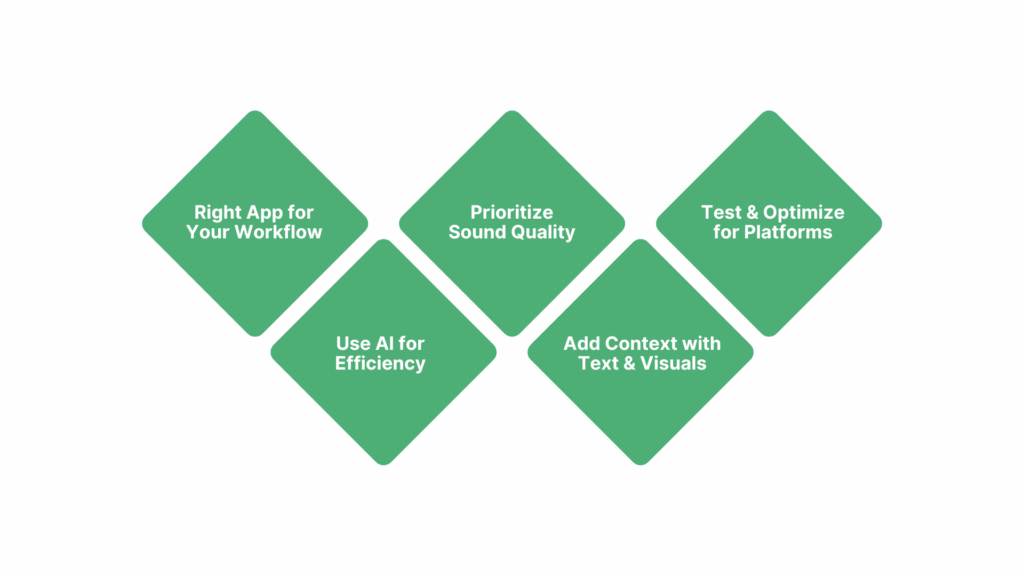
Choosing the right voice-over app comes down to precision, performance, and workflow fit. The best apps provide low-latency audio pipelines for seamless video synchronization, support multi-language narration for global reach, and integrate directly into editing timelines for efficient production.
For creators, educators, and businesses, the right tool ensures professional-grade sound, platform scalability, and flexible content adaptation—from social clips to corporate training modules.
Key Considerations for Choosing the Best App:
- Match the App to Your Workflow: Not every app suits every project. For professional corporate videos, Resemble AI offers neural voice cloning with provenance watermarking, ensuring brand consistency and IP protection.
- Leverage AI for Efficiency: AI-powered apps drastically reduce production time. Resemble AI can generate multilingual narrations in hours, enabling simultaneous launches across regions, a process that would take weeks in traditional studios. PowerDirector also uses AI tools like speech enhancers and voice changers to streamline editing and polish audio instantly.
- Prioritize Audio Quality: High-quality audio keeps viewers engaged. Dolby On provides studio-quality recordings with noise reduction, spatial audio, and filters, while iMovie offers waveform smoothing, EQ adjustments, and built-in effects. Pairing these apps with a quality microphone ensures clean input and professional results.
- Add Context with Visuals: Voiceover impact increases when paired with on-screen cues. iMovie and PowerDirector allow overlaying subtitles, branded stickers, and animated text synced to the audio timeline, improving clarity for tutorials, demos, and accessible content.
- Test and Optimize for Platform Requirements: Different platforms have different format needs. Short-form vertical videos can benefit from fast-paced narration in PowerDirector or iMovie, while corporate training or educational content may require HD exports with slower pacing, easily handled by GarageBand or Resemble AI when paired with video editors.
When it comes to creating studio-quality narration, choosing a platform that balances realism, speed, and security is key.
Also Read: 10 Best Professional Text-to-Speech Tools
Conclusion
High-quality voice-overs are a necessity for businesses that want their video content to stand out, scale globally, and resonate with audiences. By using these platforms organizations can create lifelike, brand-consistent narrations across training, marketing, and media projects without the time and cost of traditional recording.
With advanced features such as real-time generation, multilingual support, emotional tone control, and secure watermarking, businesses gain a scalable, protected, and future-ready voice strategy. From e-learning to global campaigns, Resemble AI empowers teams to deliver videos that sound authentic, connect deeply, and uphold brand credibility.
Need high-quality narration fast? Book a demo to get started today!
FAQs
1. Can AI voice-over apps replace professional voice actors completely?
Not always. AI voice-overs are excellent for scalable, consistent, and fast production (like training videos or explainer content), but professional voice actors may still be preferred for highly emotive, character-driven projects like films or commercials.
2. How do businesses ensure the voice-over quality remains consistent across multiple videos?
Most AI platforms, like Resemble AI, allow businesses to create custom brand voices or maintain standardized tones. This ensures consistency in pronunciation, pacing, and emotional delivery, regardless of the number of videos produced.
3. Is it possible to generate multilingual voice-overs without losing accuracy?
Yes. Advanced platforms support multiple languages with region-specific accents. For example, an e-learning company can produce the same training module in English, Spanish, and Hindi, while maintaining clarity and cultural accuracy.
4. What formats do voice-over tools support for video export?
Most apps allow exporting in common video and audio formats (MP4, MOV, WAV, MP3). Some, like InShot or iMovie, let users directly export optimized files for platforms like YouTube, TikTok, and Instagram.
5. How do businesses keep AI-generated voice-overs secure and authentic?
Enterprise-grade platforms embed digital watermarking and maintain content provenance to ensure voices are not misused or tampered with. This protects brands from deepfake misuse while keeping production workflows compliant with regulations.